

Custom ERP vs NetSuite and Odoo: Compare Fit, Migration and 5-Year Ownership
On this page
Choosing between NetSuite, Odoo and a custom ERP rarely fails because of missing features in a brochure. It fails when teams compare year-one license fees against a development quote without locking the same operational scope, accounting boundary and five-year transition effort.
An ERP sits under daily fulfillment, inventory valuation, purchasing and customer settlements. Before selecting a vendor or commissioning custom software, compare all three options against the real exceptions your warehouse, sales and finance teams handle every week.
Lock one operational scope before comparing platforms
Vendor demos look interchangeable on a standard order. Real differences appear when you run all three paths through one complete operational loop with real edge cases:
- Accepting a multi-line customer order with contract-specific prices and payment terms.
- Checking available stock across warehouses and storage cells, then reserving inventory without over-allocating concurrent orders.
- Handling partial shipments, backorders, inter-warehouse transfers with documented reasons and returns requiring inspection before returning to sellable stock.
- Matching incoming multi-currency payments against specific contracts and tracking overdue debt by responsible manager.
- Posting confirmed operational documents to statutory accounting without duplicate entries.
Apply the same boundary to NetSuite, Odoo and a custom proposal. If statutory tax reporting and the general ledger stay in your existing accounting software, exclude general-ledger replacement from every quote so the numbers stay comparable.
Compare custom ERP, NetSuite and Odoo side by side
Use the table below as a verification checklist when interviewing shortlisted NetSuite partners, Odoo integrators and custom engineering teams.
| Decision dimension | NetSuite | Odoo | Custom ERP |
|---|---|---|---|
| Workflow fit | Strong for standard order-to-cash, procure-to-pay and multi-subsidiary finance. Non-standard operational screens need SuiteScript or workarounds. | Broad modular coverage out of the box. Fits mid-size operations whose workflows match standard Odoo forms with light configuration. | Built around your order, warehouse, contract and approval rules, with screens designed for how each department works. |
| User and module licensing | Base platform fee plus per-user seats, paid modules (WMS, multi-subsidiary, advanced inventory) and renewal increases. | Lower per-user fee on Odoo Enterprise (or no license on Community), plus hosting or Odoo.sh tiers and third-party app store modules. | No per-seat ERP license fees. Spend goes to initial engineering, cloud infrastructure, external APIs and planned support. |
| Customization debt | Heavy SuiteScript customization raises regression testing during twice-yearly upgrades and increases reliance on NetSuite specialists. | Modifying core Python/OWL models or stacking community modules creates heavy rework during major annual Odoo upgrades. | You own the codebase and release schedule. Maintainability depends on architecture discipline and automated test coverage. |
| Multi-warehouse stock reservation | Supported via inventory and WMS add-ons, though cell-level transfer rules or strict partial-split exceptions often need scripting. | Built-in multi-warehouse routes handle standard flows; custom transfer reasons, cell rules or allocation locks need custom modules. | Reservation rules, warehouse cells, transfer reasons and concurrent locks are implemented explicitly and tested against your edge cases. |
| ERP-to-accounting boundary | Designed to own both financial accounting and operations; keeping a separate local accounting tool adds connector overhead. | Includes accounting modules, though local tax rules often still require country localization packages or an external accounting bridge. | Cleanly separates operational ERP (orders, stock, contracts, receivables view) from statutory accounting via an explicit interface. |
| 5-year ownership cost structure | Lower initial software outlay than a large build, followed by recurring annual licenses, module expansions and partner retainers. | Moderate initial setup; five-year total rises sharply when core overrides trigger costly upgrades and third-party module maintenance. | Higher year-one engineering investment, followed by predictable cloud hosting and planned maintenance without per-seat license growth. |
Five-year cost drivers teams miss in year one
Three-to-five-year totals often invert once post-launch operating lines are included alongside initial implementation quotes.
For NetSuite, scrutinize seat expansion across warehouse pickers, branch staff and read-only reviewers; module gating (WMS, sandboxes, API concurrency tiers); multi-year renewal caps after introductory discounts expire; and ongoing SuiteScript consultant retainers.
For Odoo, separate clean configuration from core model overrides. Odoo is flexible, which tempts partners to patch core stock or accounting logic directly. Those overrides compound during annual version upgrades, and third-party app store modules frequently lag behind major releases.
For a custom ERP, account honestly for obligations SaaS vendors bundle into subscriptions: upfront discovery and data modeling, cloud hosting and backups, search indexing, security patching and a planned paid support agreement for routine operations and new workflows.
Use our custom ERP cost guide to separate build modules from migration and twelve-month operating costs, and review engagement options on our pricing page.
Multi-warehouse stock control and accounting boundaries
Two boundaries decide more ERP outcomes than any feature checklist: which system owns live stock reservations and where operational tracking stops and statutory accounting begins.
In wholesale and distribution, stock discrepancies come from timing and exceptions: two sales reps quoting the last six units simultaneously, a warehouse transferring goods between storage cells while an order is waiting to pick, or a customer return that must stay in quarantine until inspected. Stacking custom scripts onto a packaged ERP spreads reservation logic across platform settings and custom triggers, making errors slow to diagnose.
Similarly, replacing statutory tax accounting on the same day you replace warehouse and order operations doubles migration risk. Established regional accounting tools already handle statutory filings cleanly. When we deliver custom ERP development for retail and distribution companies, we define a clear boundary between operational ERP records and the statutory ledger, exchanging posted documents through idempotent, reconciled interfaces.
When NetSuite or Odoo is the right choice
Custom software is not automatically the right investment. Buy and configure a packaged ERP when the platform fits your core operating model cleanly.
Choose NetSuite when:
- Multi-entity financial consolidation, general-ledger standardization and audit-ready reporting are the primary goals.
- Your order-to-cash and procure-to-pay processes fit standard NetSuite workflows without heavy SuiteScript rewrites.
- You prefer vendor-managed upgrades and have budget for certified implementation partners and annual license growth.
Choose Odoo when:
- You are a small-to-mid-size business replacing spreadsheets with standard quoting, inventory and purchasing flows.
- You can stay close to standard Odoo modules and enforce strict rules against overriding core stock or accounting models.
- User count and multi-warehouse allocation exceptions remain moderate.
If a trial in NetSuite or Odoo handles your hardest exception without heavy core overrides, buying is usually the pragmatic choice.
When custom ERP wins
A custom operational ERP earns its upfront build investment when packaged platforms force core teams into daily workarounds or unsustainable license compounding.
Choose a custom ERP when:
- Operational rules drive margin: contract-linked supplier pricing, cell-level warehouse transfers, split-shipment controls or cross-border documentation do not fit standard package screens.
- Per-seat licensing penalizes adoption: dozens or hundreds of warehouse, sales, logistics or partner users need focused daily views without multiplying annual seat fees.
- Customization debt defeats buying: discovery shows that 30% or more of daily work requires custom scripts, companion apps or core overrides, leaving you paying SaaS licenses plus custom engineering.
- You need staged migration off a legacy system: daily trade cannot pause for a single-weekend cutover, requiring process-by-process rollout synced with legacy tools.
Grounded example: CONCORD's staged transition from 1C and Excel
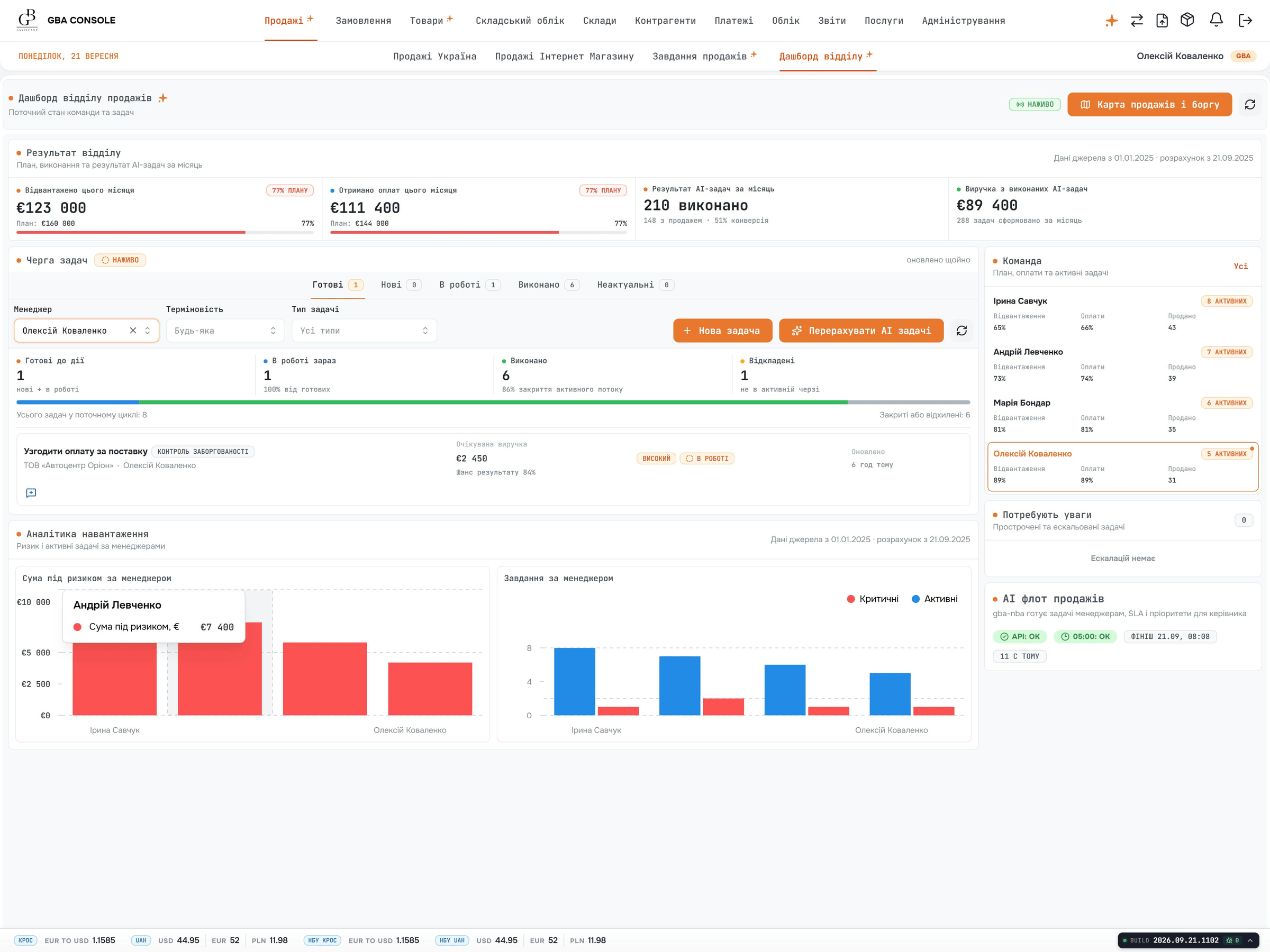
A documented example is Global Business Assistant (GBA), built for CONCORD, an importer of parts for trucks, trailers and buses.
Previously, CONCORD ran its trading operations in 1C (an accounting system common in Eastern Europe) and Excel spreadsheets. Sales, warehouse and finance worked in disconnected views. We built GBA around how each department works:
- Sales: managers expand an order directly inside the sales list to view product lines, carrier, waybill number, contract terms and payment status alongside each client's turnover and overdue debt.
- Warehouse: stock is tracked by product, warehouse and storage cell, and every transfer records its source, destination, quantity, reason and comment.
- Purchasing and cross-border paperwork: supplier agreements tie directly to incoming goods and settlements; while CONCORD traded through Poland, staff generated customs, transport, export, Tax Free and VAT-refund documents directly inside GBA.
- Multi-currency finance: payments across UAH, EUR, USD and PLN link to counterparties, contracts and accounts, paired with a debtor register tracking overdue and upcoming balances by manager.
- Phased rollout: GBA and the old system exchanged data in sync while workflows moved over stage by stage, until GBA replaced the legacy system completely.
Decision scorecard for CTOs and operations directors
Score your operation against these eight checks with operations, finance and IT in the same room before requesting binding proposals.
| Check | Leans toward NetSuite or Odoo | Leans toward Custom ERP |
|---|---|---|
| 1. Primary operational bottleneck | Multi-entity financial consolidation, general ledger and standard reporting. | Distinctive order intake, warehouse allocation, contract pricing or cross-team handoffs. |
| 2. Share of custom rules | Light configuration covers daily work; standard screens fit staff habits. | Core daily screens require heavy scripting, workarounds or companion apps. |
| 3. Five-year user growth | Stable seat count with few occasional or field users. | Growing headcount across sales, warehouse and branches where seat fees compound. |
| 4. Warehouse complexity | Standard pick-pack-ship across uniform locations. | Cell-level stock rules, custom reservation locks, split shipments or cross-border paperwork. |
| 5. Accounting boundary | Replacing statutory accounting and operations in one suite. | Keeping an established local accounting system while owning the operational layer cleanly. |
| 6. Migration constraints | Clean cutover fits inside one planned maintenance window. | Daily volume requires phased rollout with temporary legacy synchronization. |
| 7. Internal ownership | Preference for vendor-managed upgrades and partner administration. | Readiness to own the roadmap with an internal lead and dedicated engineering support. |
| 8. Data and exit control | Standard vendor exports and API limits meet audit needs. | Direct SQL ownership, custom search indexing and zero vendor lock-in matter. |
Prove the riskiest workflow before committing
Before signing a multi-year contract, ask each shortlisted team to demonstrate one awkward scenario on realistic data: a split order across two warehouses with a contract discount, concurrent stock reservation, partial multi-currency payment and a retried integration call. Put the full five-year costs (licenses, implementation, data cleanup, migration rehearsals, hosting, upgrades and support) into one comparable sheet.
Explore module boundaries in our Solution Studio and review our ERP data migration checklist before locking launch dates. If you want a practical engineering review of your shortlist or legacy 1C/spreadsheet workflow, share your hardest operational process and current systems.
Related project experience.

Global Business Assistant
Orders, inventory and multi-currency accounting in a connected ERP and CRM.
View project