

Assess the current system
We map dependencies, user roles, data and operating constraints to identify which parts of the system need to change and which can stay.
We assess the slow or fragile parts, then replace them step by step while the business keeps running. Data transfers, integrations and business rules are checked before each rollout, with a recovery plan for the processes affected.
Modernisation starts with the software you already use: where it slows work down, what remains useful and which dependencies limit change. Depending on the findings, we recommend extending it, connecting new modules or replacing it in stages.
We map dependencies, user roles, data and operating constraints to identify which parts of the system need to change and which can stay.
For each business workflow we compare extending the current platform, connecting new modules and replacing components.
We transfer the agreed records and history, reconcile the results and build the exchanges needed while old and new systems operate together.
We prepare acceptance checks, user training, cutover steps and recovery procedures before the new workflow enters daily use.
We assign one authoritative system to each record, define the direction and timing of updates, and set the rules for duplicates and conflicting changes. Trial exchanges and reconciliation show whether the source systems can support the required synchronisation.
We record the reports, calculation rules and historical comparisons your teams rely on. Together we choose which reporting tools to keep, which views to rebuild and which data to synchronise. Before the switch, we reconcile the agreed figures against the same source records and reporting period.

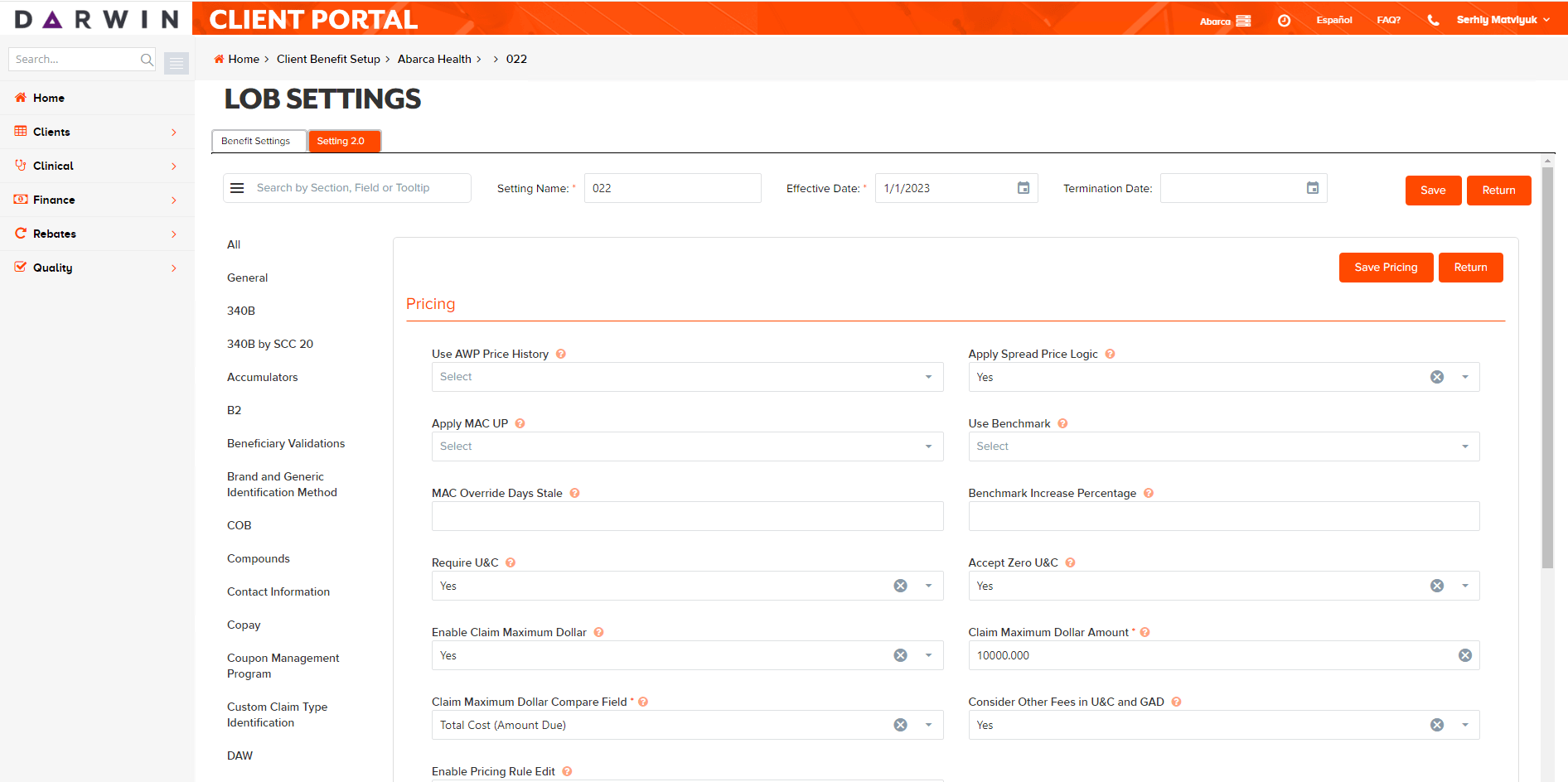
We modernised 120 pages for configuring insurance benefits while keeping the existing claims engine running. The updated interface retains the rules for each client, plan and group.

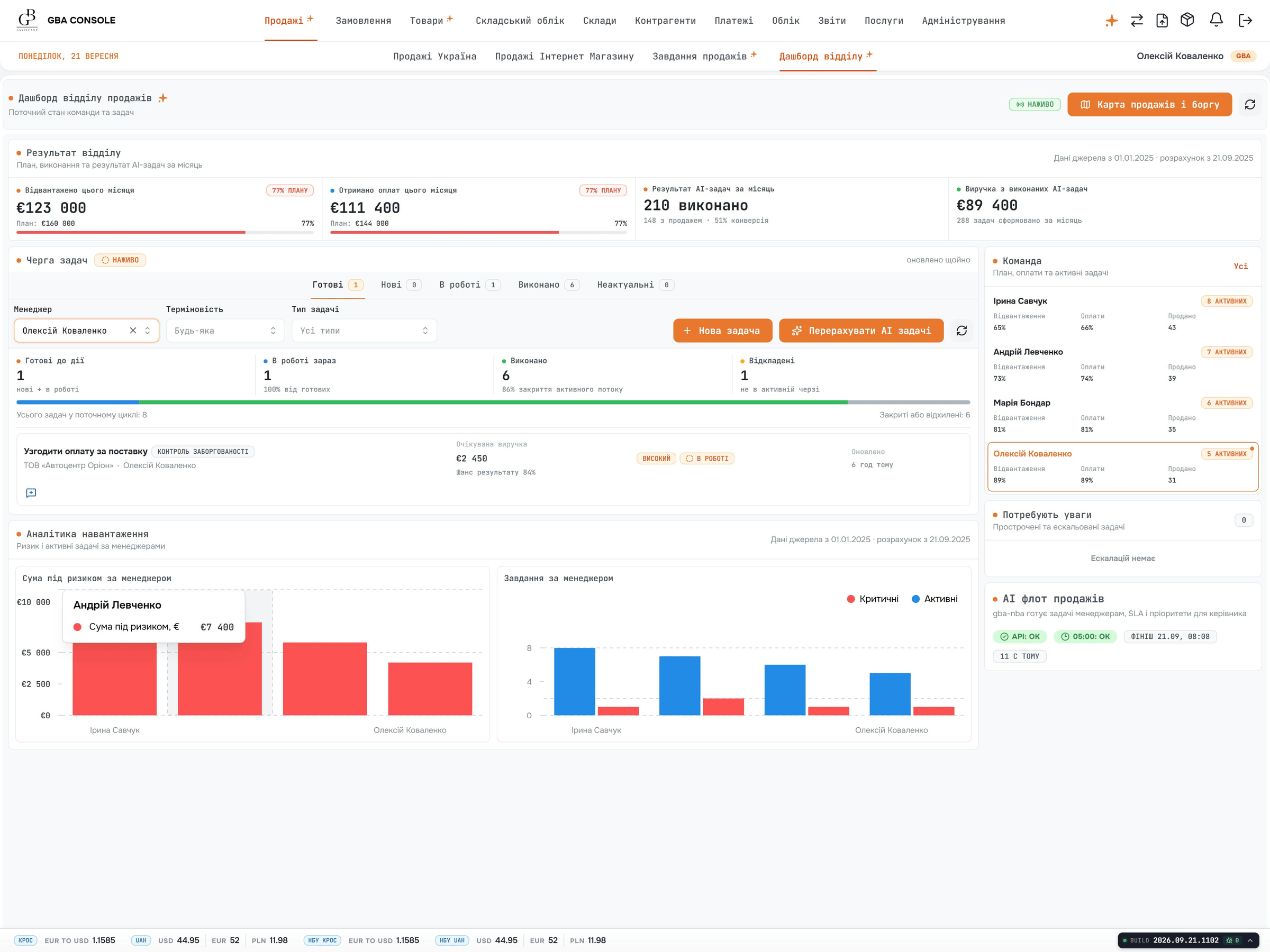
An ERP and CRM that replaced a legacy system at CONCORD, an importer of truck, trailer and bus parts. Sales, warehouse and finance work on the same order. AI writes tasks for sales managers and analyses warehouse data for purchasing.
Your CTO and engineers know the system’s history, its constraints and its operating standards. We agree how that knowledge shapes the architecture, code review, delivery and production ownership.
We name who approves the architecture, who reviews changes and who accepts a release. Work happens in the agreed repository, and dependencies on your team are visible in the plan.
We divide deployment, monitoring, backup and incident duties. Your team keeps the responsibilities it wants to retain, and our scope covers the engineering and support you need.
A distributor uses spreadsheets, a warehouse application and separate accounting. The assessment turns that setup into a staged plan, with a decision and evidence for each component.
Posted entries and financial ownership stay in the current system.
Finance validates the exchange fields and a reconciled sample.
Expose the stock and shipment information the new order view needs.
The technical owner proves supported access, data freshness and failure handling.
Introduce one order record with identifiers, permissions and an exception owner.
Operations accepts a pilot and reconciles open orders before ownership switches.
Warehouse access is unverified in this example, so we test the interface before promising automatic stock updates. If only a scheduled export is available, the order view shows the update time and delivery is promised only after warehouse confirmation. If that delay is unacceptable, the scope is revisited.
The pilot starts with customer-linked orders and an exception queue for one team. Accounting and stock ownership stay in their current systems; forecasting and additional sites are deferred.
Source mapping, permissions, reconciliation, user preparation and recovery checks.
Our delivery lead prepares the rehearsal, operations accepts the workflow and finance checks the totals.
We agree the recovery owner, how new transactions are reconciled and when the old workflow stops accepting changes. These checks decide whether the cutover can proceed.
An existing CRM holds customer 9001. The new system needs that customer, its contacts and its order history. The transfer rules are agreed from your data and systems.
We match the record to the new system by agreed identifiers. Missing fields and possible duplicates go for review.
We import the customer and its related history, then compare selected records and totals with the source.
If an update arrives while both systems run, it follows the agreed ownership and conflict rules instead of creating a second customer.
The report lists open orders past their planned dispatch date, what is blocking each one and who should act.
Scroll the table horizontally to compare all columns.
| Order | Planned dispatch | Status | Reason for attention | Responsible team |
|---|---|---|---|---|
| ORD-1042 | 21 Sep 2026 | Awaiting stock | One item is unavailable | Purchasing |
| ORD-1048 | 21 Sep 2026 | Awaiting approval | Delivery change needs approval | Operations |
| ORD-1051 | 20 Sep 2026 | Ready to dispatch | Carrier booking is pending | Logistics |
The budget depends on what can stay, what must change and how long old and new systems need to run side by side. It covers dependency investigation, trial transfers, integration changes, reconciliation and recovery preparation. A replacement estimate needs evidence from the current system; if gathering it takes more than a conversation, we agree a separate paid assessment.
The code, dependencies and business rules we need to understand before planning changes.
The parts to rebuild and the connections needed while old and new software run together.
Trial data transfers, report comparisons, staff preparation and a recovery plan.
We plan around your operating hours and critical workflows, using a staged rollout or parallel operation where the systems allow it. Rehearsals, data checks and a fallback procedure come before the cutover, and any necessary service interruption is agreed in advance.
No. Migration transfers an agreed set of records and history once. Synchronisation keeps selected data aligned while both systems continue to operate. A phased transition may need both, with clear ownership of updates and checks for duplicates, conflicts and totals.
We inspect supported exports, database access and vendor options, then test a candidate method on sample data. A scheduled exchange, an intermediate service or a staged replacement may suit better than direct integration. The choice depends on access, update timing and the effect on daily work.
Yes. We identify a component with a clear boundary, map its dependencies and design the connections to the system you keep. Implementation includes tests of the workflows that cross that boundary, plus data transfer, user preparation and recovery steps for the rollout.
Yes. We map each department workflow, keep accounting and daily operations active, and move one area at a time while old and new systems stay synchronised. Before each stage goes live, we run trial imports, reconcile stock and financial totals, and agree a fallback path. At CONCORD, we replaced 1C and spreadsheets in stages until Global Business Assistant handled sales, warehouse and finance on its own.
A dependency map, decisions on what to keep or replace, a migration approach, open risks and an implementation estimate. Together they support a decision on the first release and show what still needs investigating before development.
We define record ownership, restrict access to migration tools and temporary copies, and test permissions in both environments. The transition plan names who handles backups, recovery and incidents, and when temporary access and copies are removed.
Yes. We prepare walkthroughs, instructions and an administrator guide for each role. Before rollout, staff practise typical tasks and we fix the steps that confuse them. Training and launch help are listed in the delivery plan.
Yes. Before release we agree a support plan: what it covers and how to report issues. We do the agreed maintenance, investigate problems and review user feedback with you. Support and new features are priced separately, and you see the terms before the system goes live.
Map dependencies, choose a first release, rehearse migration, and agree cutover and recovery decisions.
Migration worksheetVerify product catalogues, stock balances, open orders and rollback checks before switching off a legacy ERP.
Migration worksheetCheck that rebuilt or connected reports use the same definitions and agreed source records.
Reporting definition templateInclude integration, data cleanup, migration rehearsals, user preparation, and support in the estimate.
Budget planning workbookFollow one order through retries, late updates and conflicting data before defining your own exchange.
Describe your processes, the systems you use today and what you want to improve first. Our CEO leads the first discussion: possible approaches, open questions and what needs checking before an estimate.