

Capture the enquiry
Link the enquiry to a customer, assign a colleague and set a reply date.
A CRM (Customer Relationship Management) system keeps customer details, conversations and deals in one customer record. Your team sees what was agreed and who follows up next.
A customer asks for a quote. Sales prepares the offer, then passes the agreed work to service with the conversation history attached.
Link the enquiry to a customer, assign a colleague and set a reply date.
Save the proposal, changes and customer decision in the customer record.
Send the agreed work to the delivery team with the customer history and next task.
Check overdue tasks and open requests before the next customer conversation.

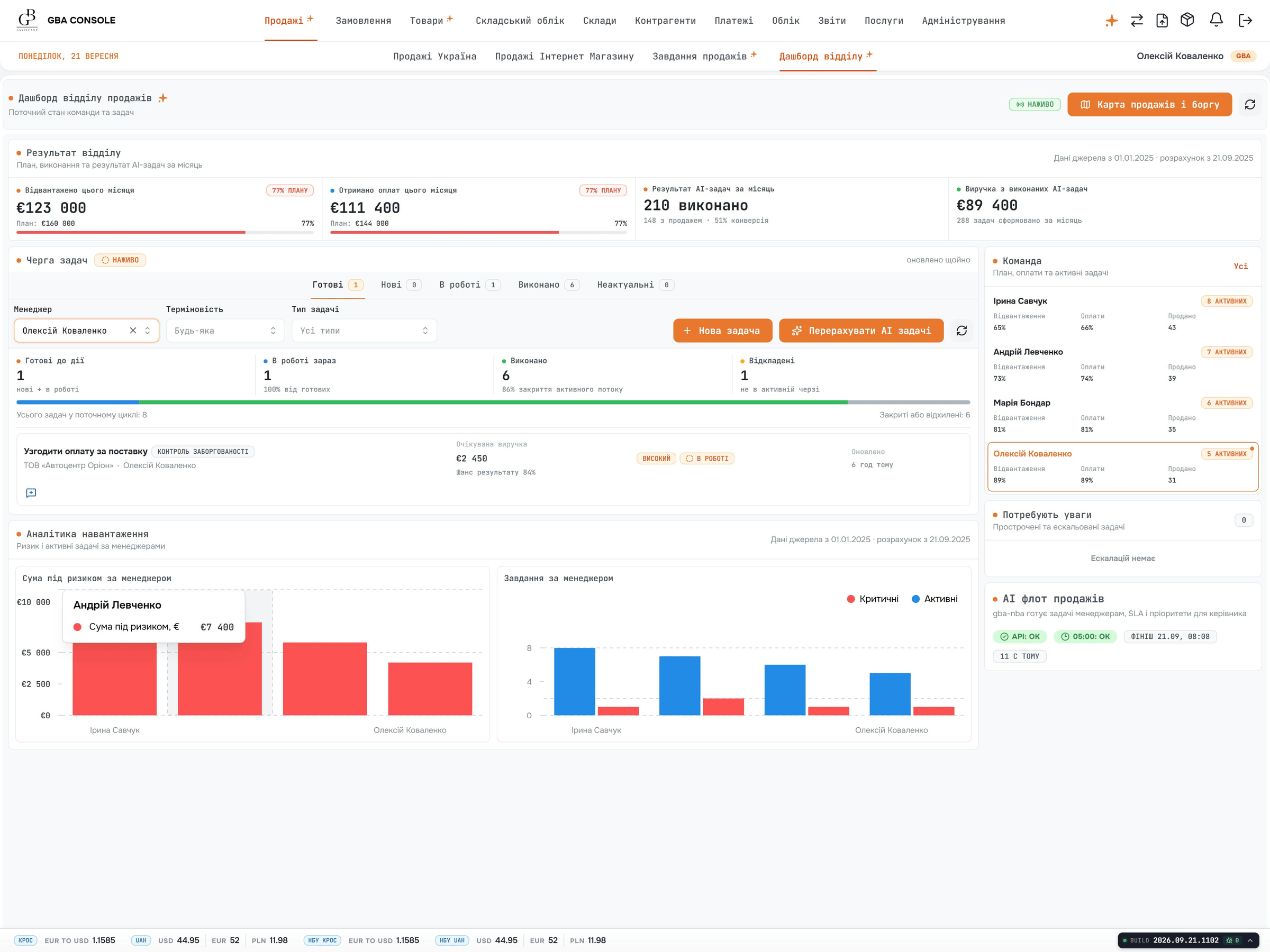
An ERP and CRM that replaced a legacy system at CONCORD, an importer of truck, trailer and bus parts. Sales, warehouse and finance work on the same order. AI writes tasks for sales managers and analyses warehouse data for purchasing.

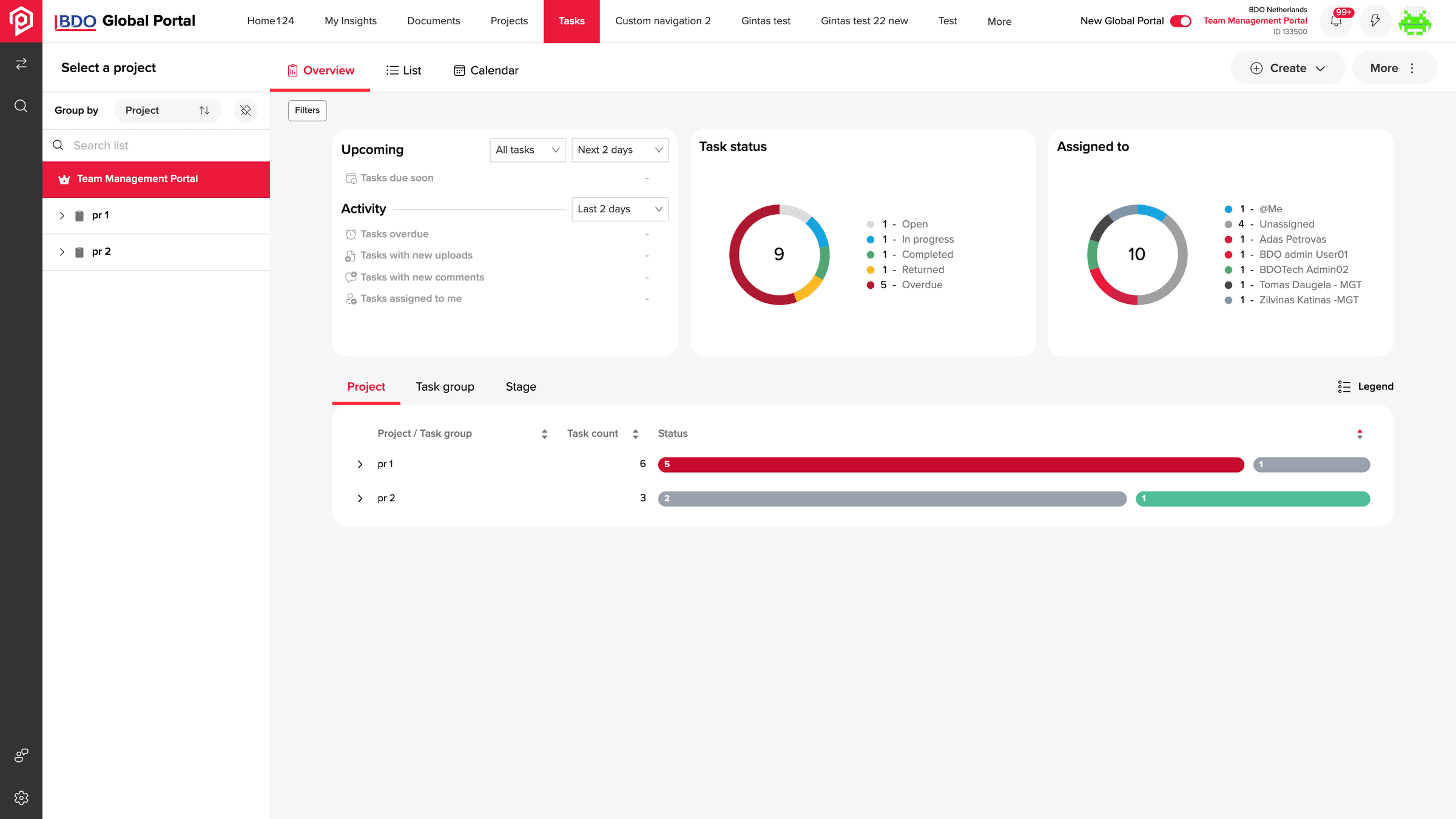
BDO teams request documents from clients as tasks in one portal. Clients upload files, and reviewers complete each task or return it with a comment.
We import your contacts, conversations and orders into a test version first. Together we resolve duplicates and check that each record belongs to the right customer before the final move.
See which customers are waiting for a reply and which deals have stopped moving. Use reports in the CRM or your current reporting tool, with totals checked against the source records.
We check whether your current CRM can handle the sales stages, permissions and connections you need before recommending a custom build.
The stages, approvals and access rules each sales or service team needs.
The records to clean up and move, plus the ERP, email and other tools the CRM connects to.
Customer accounts, reminders and tasks that need to run automatically.
Yes. We review what works, where staff need workarounds and what the CRM can support. Then we recommend configuration changes, additional features or a replacement, with the costs of migration and integrations included.
Yes, if the ERP provides an API or another way to exchange data. Before development, we set which system updates customers, orders and payments, then test the exchange. Failed updates are retried, and unresolved errors are shown to the team.
We match customers using agreed details, such as an account ID. Your team reviews uncertain matches before records are merged. We also test repeat imports and check that orders and conversation history remain linked to the right customer.
No. You decide who may view, edit or export each type of record. We test both permitted and blocked actions, including access to another customer’s records, and show administrators how to change permissions or remove accounts.
Salesforce or HubSpot is a practical fit when standard pipelines, marketing automation and off-the-shelf add-ons cover your process. A custom CRM makes more sense when seat licences and tier upgrades rise quickly across operational staff, when deals tie directly into custom pricing, contract approvals or ERP stock checks, or when customers need a branded portal linked to the same records.
We design screens around the tasks managers repeat every day, removing extra fields and manual re-entry from email or spreadsheets. Before company-wide launch, we import real contacts into a test environment, run a pilot with one sales team, fix steps that slow calls or follow-ups, and provide role-based guides for staff and administrators.
We estimate the timeline after agreeing what the first release must do. Data cleanup, integrations and your review time affect the schedule. We can start with one team, test the full sales process and add other teams after the pilot.
We agree which data needs protection, how long to keep it and who may access or export it. These rules cover storage, backups and connected tools. Before launch, we test access for each user group and document who manages it.
Yes. We prepare walkthroughs, instructions and an administrator guide for each role. Before rollout, staff practise typical tasks and we fix the steps that confuse them. Training and launch help are listed in the delivery plan.
Yes. Before release we agree a support plan: what it covers and how to report issues. We do the agreed maintenance, investigate problems and review user feedback with you. Support and new features are priced separately, and you see the terms before the system goes live.
Compare sales stages, permissions, integration work and costs before choosing Salesforce or a custom CRM.
See how CRM and ERP share orders, handle failed updates and avoid conflicting records.
Check what your current CRM can do, what needs connecting and when a custom build makes sense.
Decide which customer records and history to keep, how to match them and what to check before the move.
Migration worksheetCompare a CRM with and without a customer portal, including the costs of moving data, testing and support.
Budget planning workbookReview what each proposal includes and which assumptions can change the cost.
Proposal comparison workbook