The operator answers from the order card
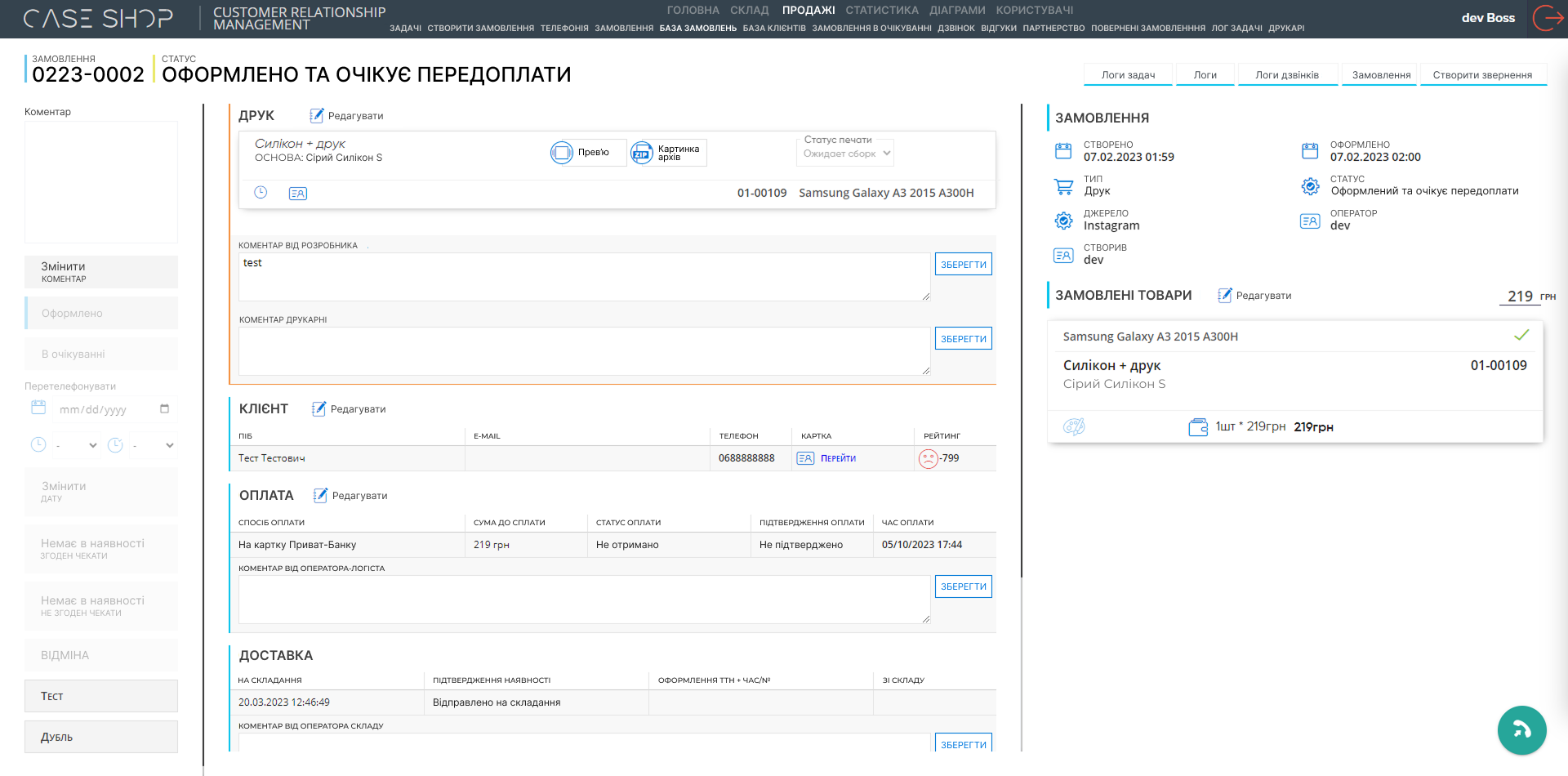
Order status, payment, print status and the waybill number are on one card. The customer’s rating and history are beside them.
Order detailsWe built the CRM for CaseShop, an online shop in Ukraine that prints customers’ designs on phone cases. Operators take orders in it, and the print shop, warehouse and logistics update their own stage of each order.
What changes for the teamOur work: 2018–2019
An order passes from the operator to production, packing and delivery. Stock and payment are checked on the way.
The customer calls the operator, even when the answer sits with the print shop, the warehouse or logistics.
Development of the CRM web application: the order card, product selection with stock, the customer base, telephony and reports.
Access is by role: operators, print, warehouse and management.
Order status, payment, print status and the waybill number are on one card. The customer’s rating and history are beside them.
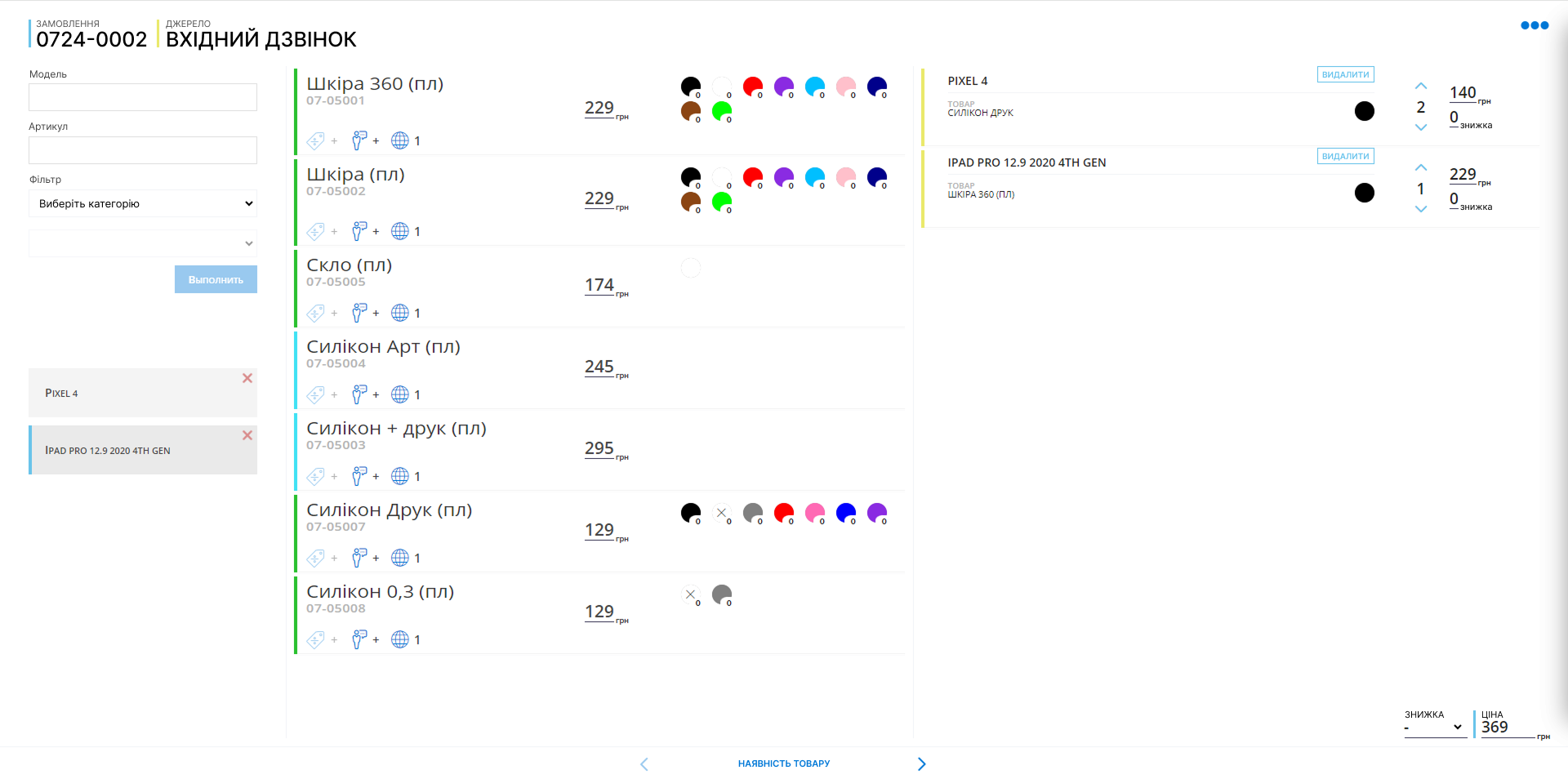
Order detailsThe operator picks the phone model and sees the colours in stock before adding an item. The stock check is the next step of the same order.
Product selectionThe print shop, logistics and the warehouse comment against their own stage of the order. The operator reads the comments on the same card.
Order detailsOrders waiting for stock or a callback, and returned orders, have registers of their own. Defects are tracked there too.
A case with a custom print is made after it is sold. The customer’s file has to reach the print shop, and the operator has to know when the print is ready.
The print section of the order card holds the base case, a preview, the print file and the print status. The print shop comments against that stage. Payment and delivery have sections of their own on the same card.
See the print section on the order cardDescribe one order from the first enquiry to dispatch, with a stock shortage or a return on the way. We will tell you which sections and statuses your order card needs first.
A customer calls about an order. The operator needs the payment status, whether the print is ready, whether the case is in stock and when it was handed to the carrier, before answering.
The order card shows the print, the customer, payment and delivery in separate sections, with the status and the ordered items in the side panel. Comments from the print shop, logistics and the warehouse stay with their stage.
While taking an order, the operator must find the right case for the customer’s phone model and know whether the colour is in stock.
Each product shows its price and a dot per colour with the quantity in stock. If the requested colour is missing, the order records whether the customer agrees to wait, and the next operator sees that decision.
The order shows its number, source (incoming call, Instagram), type, status, operator and creation time. Separate sections cover the print (base case, preview, print file, print status), the customer (name, email, phone, rating), payment (method, amount due, status, confirmation, time) and delivery (sent for picking, availability confirmed, waybill number).
The operator picks the phone model and filters products by article and category. Each product line shows the price and the colours in stock with the quantity of each. Selected items, quantities, discounts and the total sit beside the list; the stock check is the next step of the same order.
The customer record keeps contacts, rating and earlier orders. IP telephony links each call to the customer, and the order remembers whether it came from a call or a social network. Call logs and task logs open from the order.
The side panel moves the order through its stages: placed, waiting, call back on a date and time, out of stock with the customer agreeing or refusing to wait, cancelled, duplicate. Pending orders and returned orders have registers of their own, and defects are tracked with them.
Reports on sales, product demand and staff performance, shown as tables and charts. A users section with role-based access for operators, print, warehouse and management.
A web application with an API, a relational database and a cache.
The order card, product selection and the other CRM screens are written in React and TypeScript.
ASP.NET Core Web API connects the web interface with the application’s business logic and data.
Microsoft SQL Server stores orders, customers and stock.
Redis caches application data in memory to cut repeated database reads.
The CRM was built for one phone-case shop, but its rules are common to retailers that make or finish products to order:
Online shops that print, engrave or assemble goods to order and run production from the order itself.
Retailers that take orders by phone, Instagram and the website and need one order register.
Shops with stock in colours and sizes, where availability is checked while the order is taken.
Small retail teams in which an operator, a workshop and a warehouse each handle part of the order.
A first release usually covers the order card with statuses, the product list with stock and the customer base, connected to the telephony or the online shop you already use.
$77,300–$122,500Typical full first release
A first release with these modules, priced with our published budget model. Prices in USD, excluding VAT.
Example budget, not a quote. Your proposal will include the cost of your agreed scope, integrations, data work and support.
Tell us what your team sells and which task makes them switch between the most tools. We start the CRM there.
Discuss your CRM