Workframe is the platform where Newmark’s brokers and portfolio teams track lease dates, run deals and prepare property tours. AI extracts the terms from lease PDF files, and staff check and approve them. Our part was React application modules, .NET services and Azure infrastructure.
Commercial property teams manage both long-term lease obligations and active deals. A notice deadline matters across the portfolio; a client tour depends on verified details about each available space.
Workframe holds both: lease records with their critical dates, and deals with their properties, tours and discussion.
Newmark, a commercial real estate firm. Workframe is the platform its brokers and portfolio teams work in.
Users
Brokers, portfolio managers, back-office lease reviewers and transaction teams.
Modules
Portfolio, leases, lease quality check, transactions, property selection with space verification, tourbooks and broker profiles. The navigation also holds pipeline, prospecting, workplace analytics and agency leasing.
What changes for the team
Portfolio managers, lease reviewers and deal teams each work from their own screen.
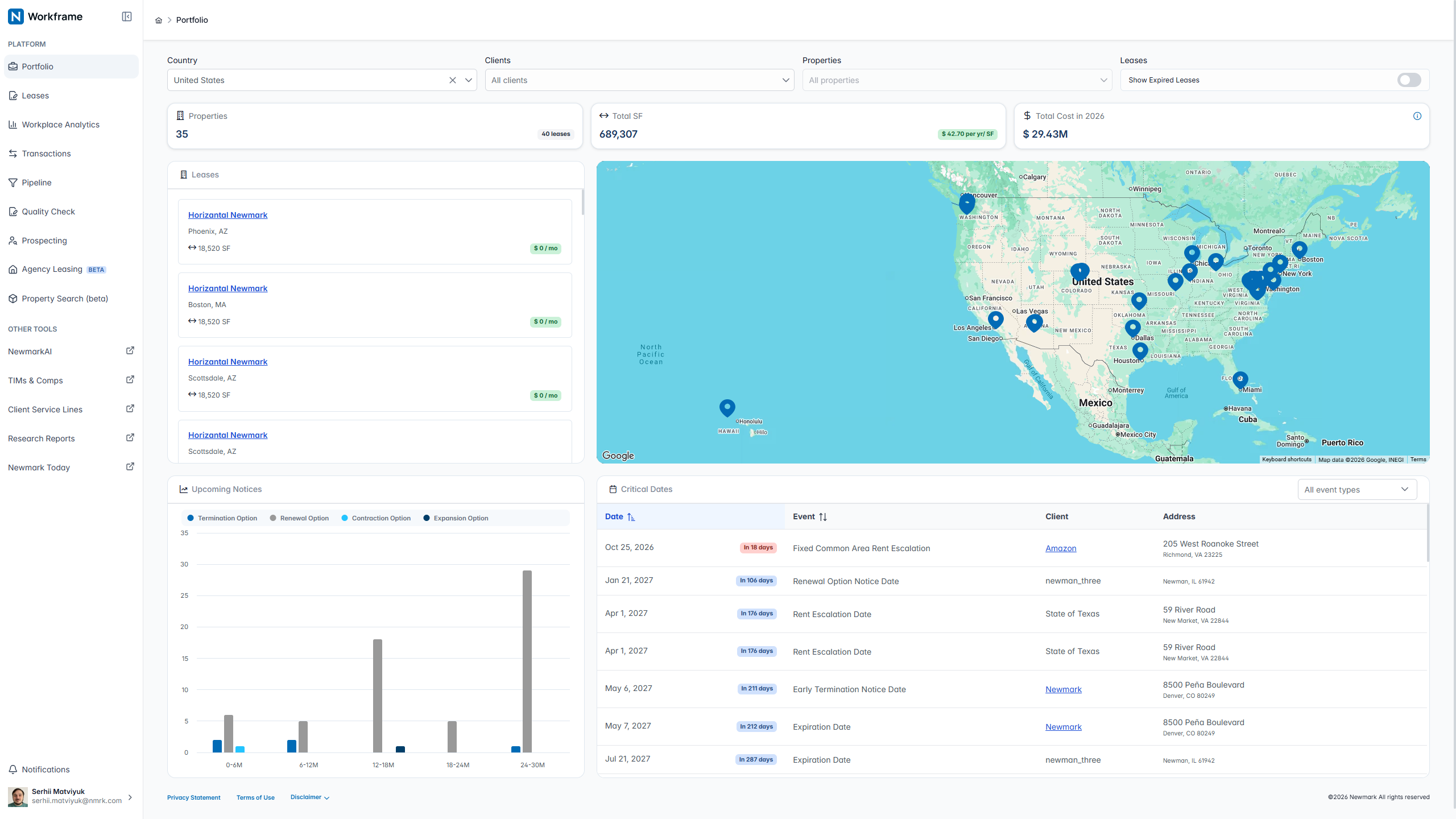
The next notice date is visible across the portfolio
Renewal, termination, expiration and rent escalation dates are listed with days remaining, the client and the address. A chart counts upcoming termination, renewal, contraction and expansion notices by period.
One page for a deal’s properties, tours and discussion
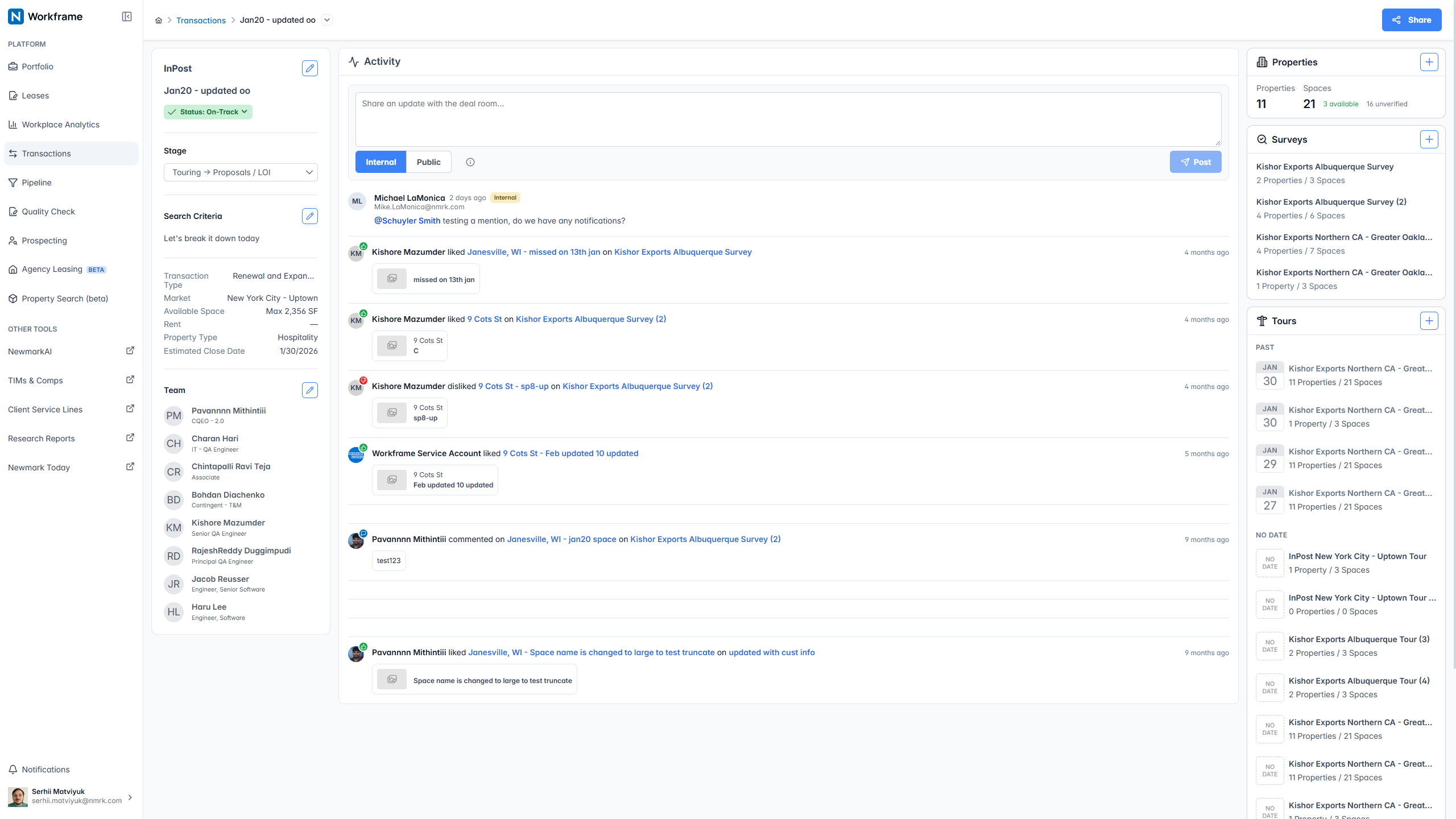
Linked properties, surveys, tours and the team’s posts are on the transaction page. A new team member reads the history there instead of a mail thread.
Area, rent, availability and lease terms are confirmed on the space record, then the space goes into the survey or tour. The tourbook and its PDF are produced from the same data.
A date extracted from a lease can affect a renewal decision. The workflow needs an explicit check before approval.
Workframe keeps three steps apart: AI extraction, a back-office quality check, then review and approval. The lease screen names all three before the PDF is uploaded. Our contribution was to the wider workspace: React modules, .NET services and Azure infrastructure.
Tell us which documents you process and who signs off the extracted data. We will tell you where we would put the human checks and what the review queue should show.
The portfolio screen totals properties, leases, square feet and the year’s cost, and puts every location on a map. Filters narrow it by country, client and property.
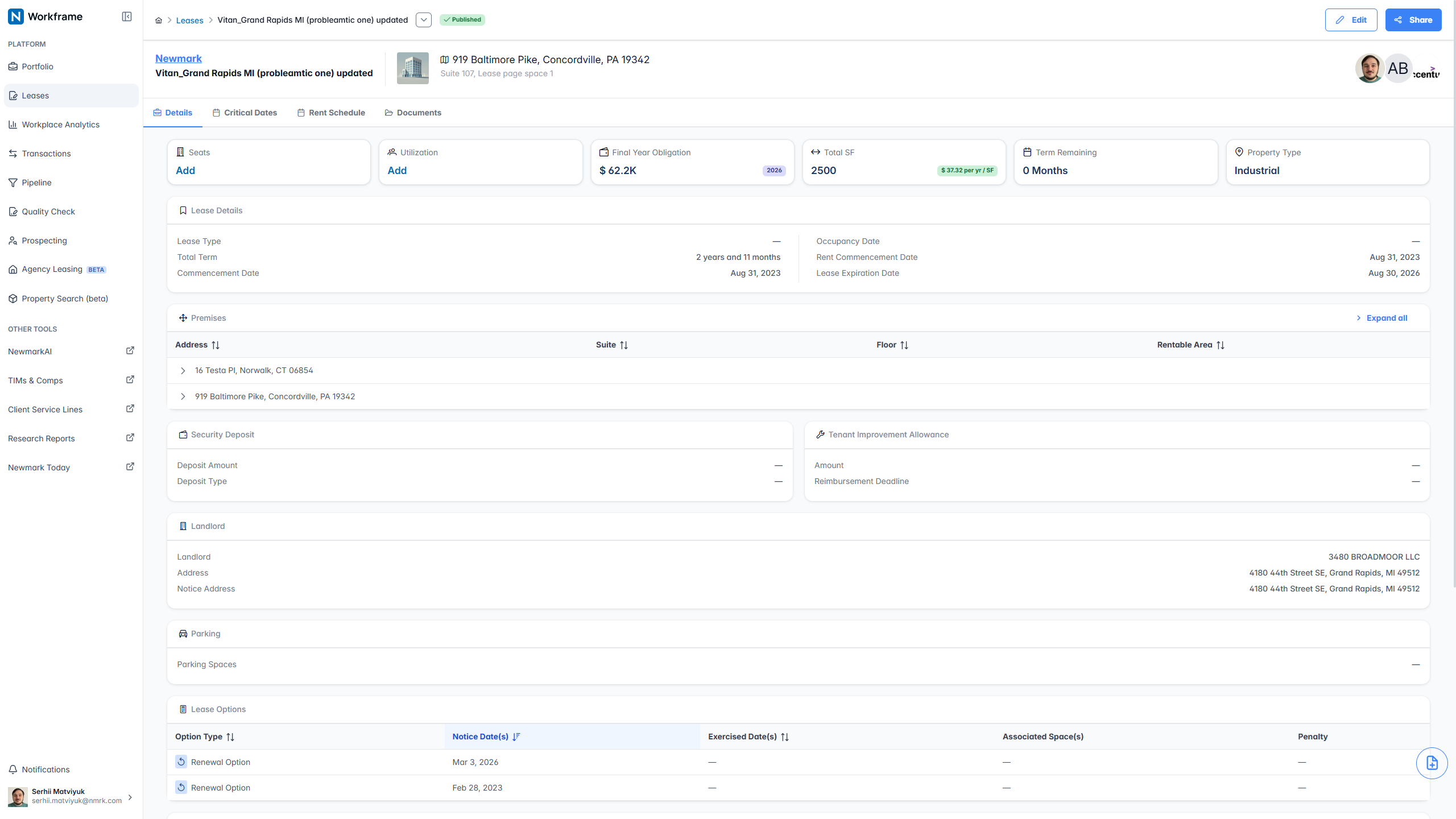
A new lease starts with the property, the represented party, the teams and the PDF files. The lease record then groups premises, dates, financial terms and renewal options, with the rent schedule and documents in separate tabs.
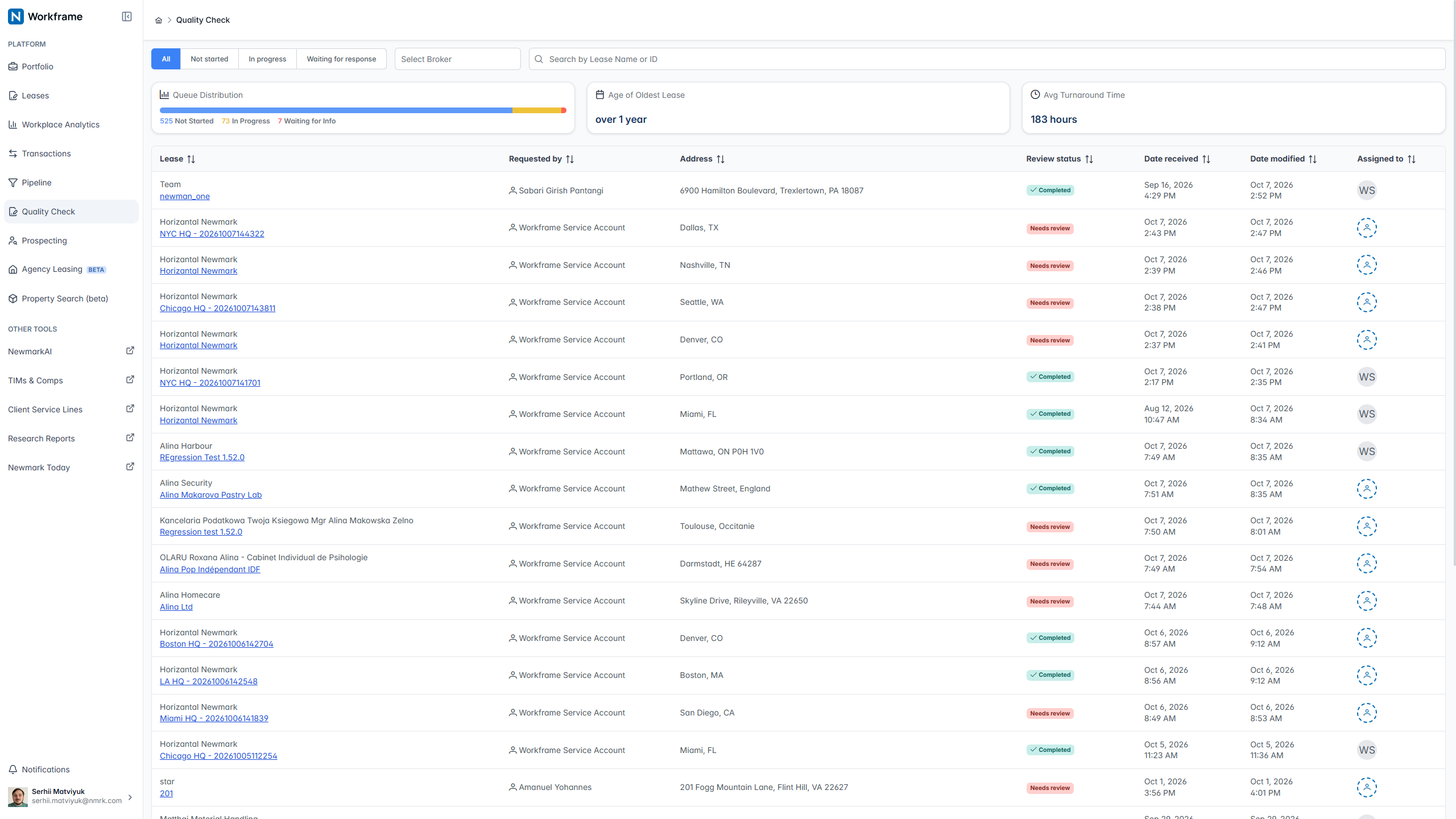
Enlarge imageEach lease shows its status, received and modified dates and assigned person. The header shows queue distribution, the oldest item and the average turnaround time.
Deals
A deal sits on a board in one of five stages: opportunity, touring, negotiations, closed or lost. Its page holds the search criteria, the team and an activity feed with internal and public posts.
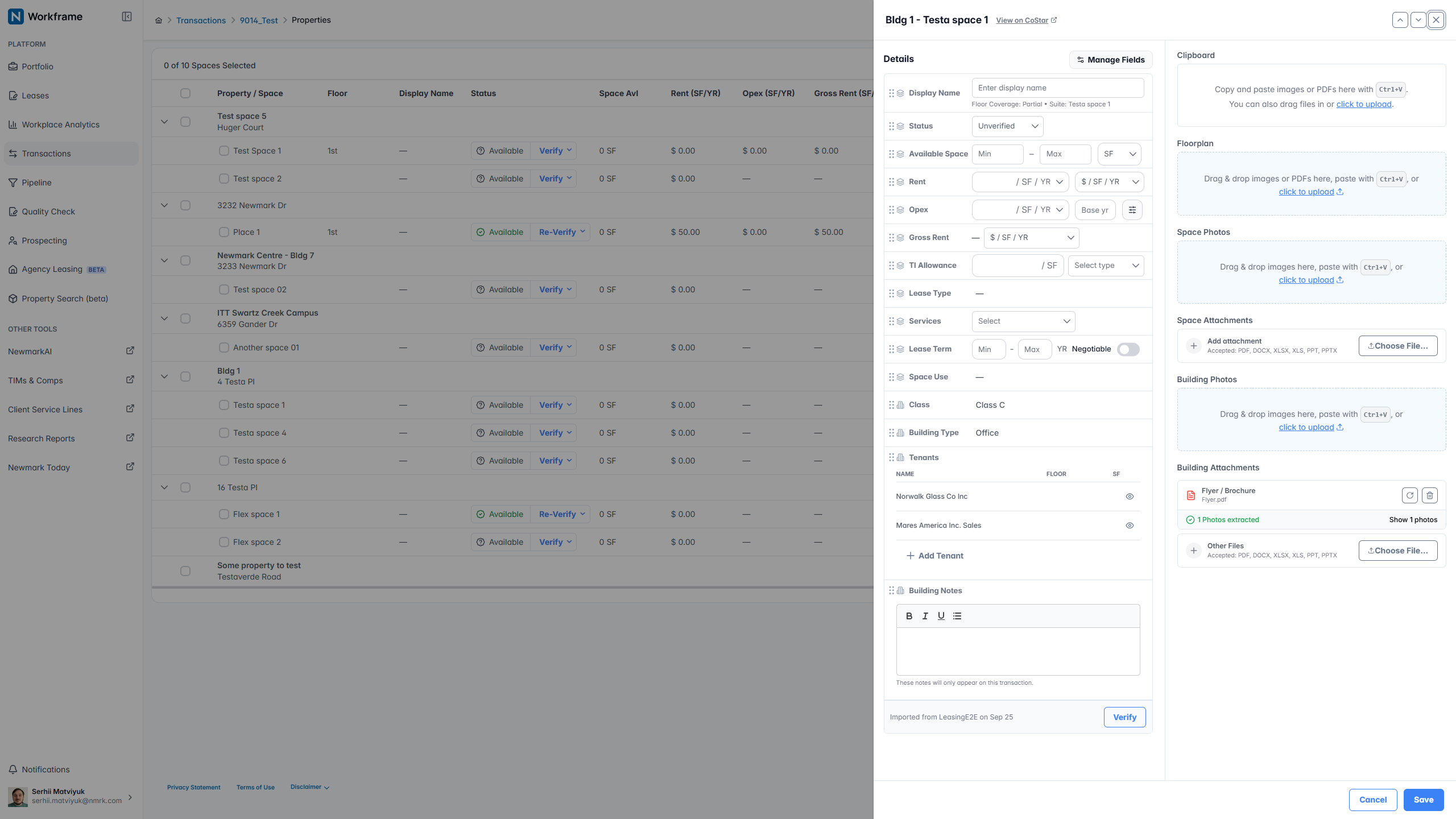
One building may have several spaces with different area, rent and availability. The team verifies each space before adding it to the client’s shortlist and tour.
Enlarge imageThe verification panel combines availability, area, rent and lease terms with floor plans, photos and attachments. Verification is an explicit action on the space record.
What we built
Portfolio and critical dates
Filters by country, client and property, with expired leases hidden or shown. Totals for properties, leases, square feet, cost per square foot and the year’s cost, a map of locations, upcoming notices by period (termination, renewal, contraction and expansion options) and a table of critical dates with the event, days remaining, client and address.
Lease records
A lease shows the represented client, the property and suite, seats and utilisation, final-year obligation, square feet, term remaining and property type. Lease details, premises, security deposit, tenant improvement allowance, landlord, parking and lease options with notice dates are on one page; critical dates, the rent schedule and documents have their own tabs.
Automated lease abstract
A new lease starts with the lease country, the address of the premises, the property type, the represented party (tenant or landlord), the teams to share it with and the PDF files. The steps that follow are named on the screen: AI extraction, a back-office quality check, then review and approval.
Quality check queue
Leases awaiting review with the requester, address, review status (needs review or completed), dates received and modified and the assigned reviewer. The header shows the queue by status, the age of the oldest lease and the average turnaround time. Filters by status and broker, search by lease name or ID.
Transactions
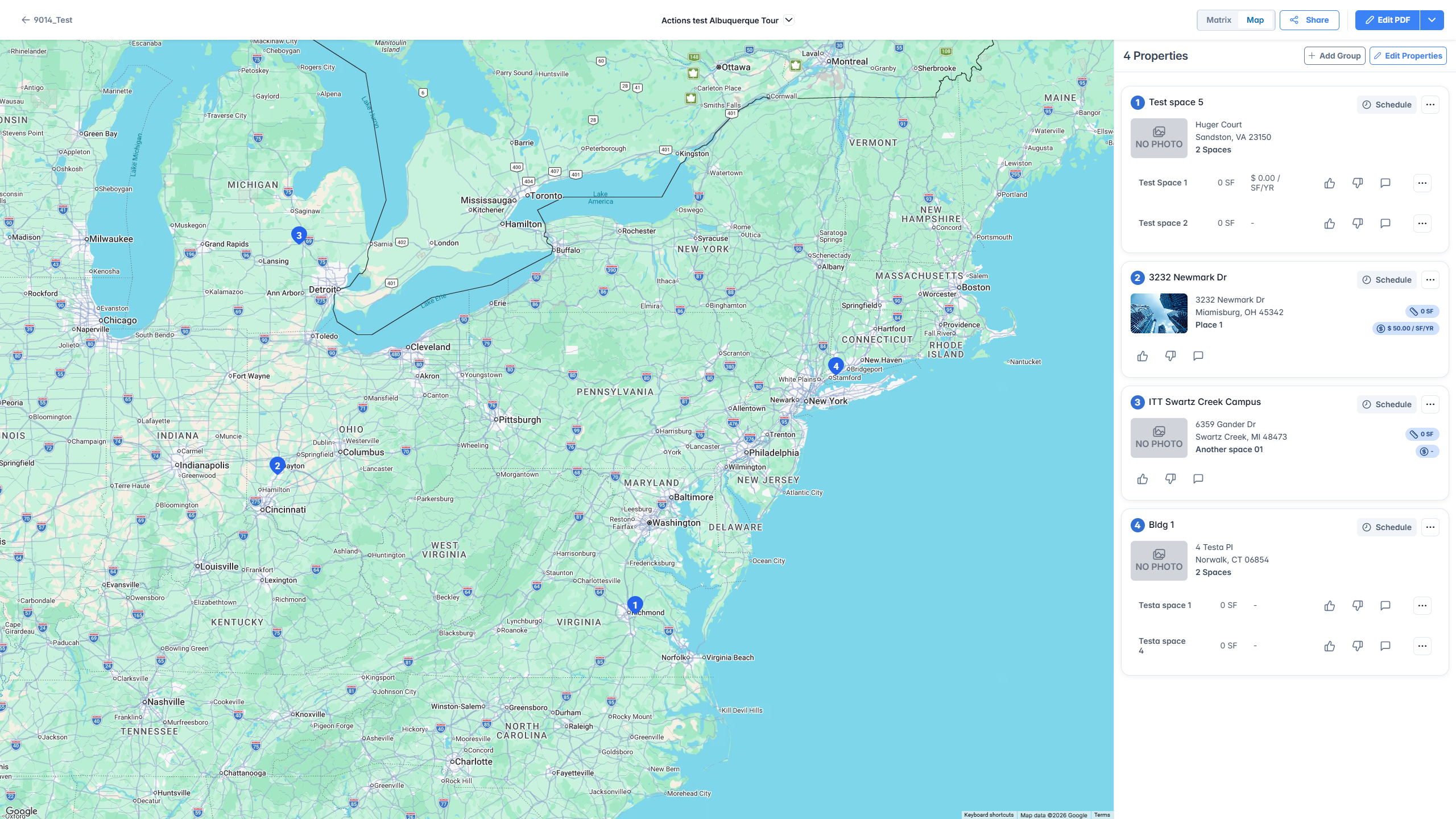
A board by stage: opportunity, touring, negotiations, closed and lost, filtered by company and market. Each card carries the client, transaction type, region, estimated close-out, team and status. The transaction page holds the search criteria (type, market, available space, rent, property type, estimated close date), the team, an activity feed with internal and public posts, and the linked properties, surveys and tours.
Space verification and tourbooks
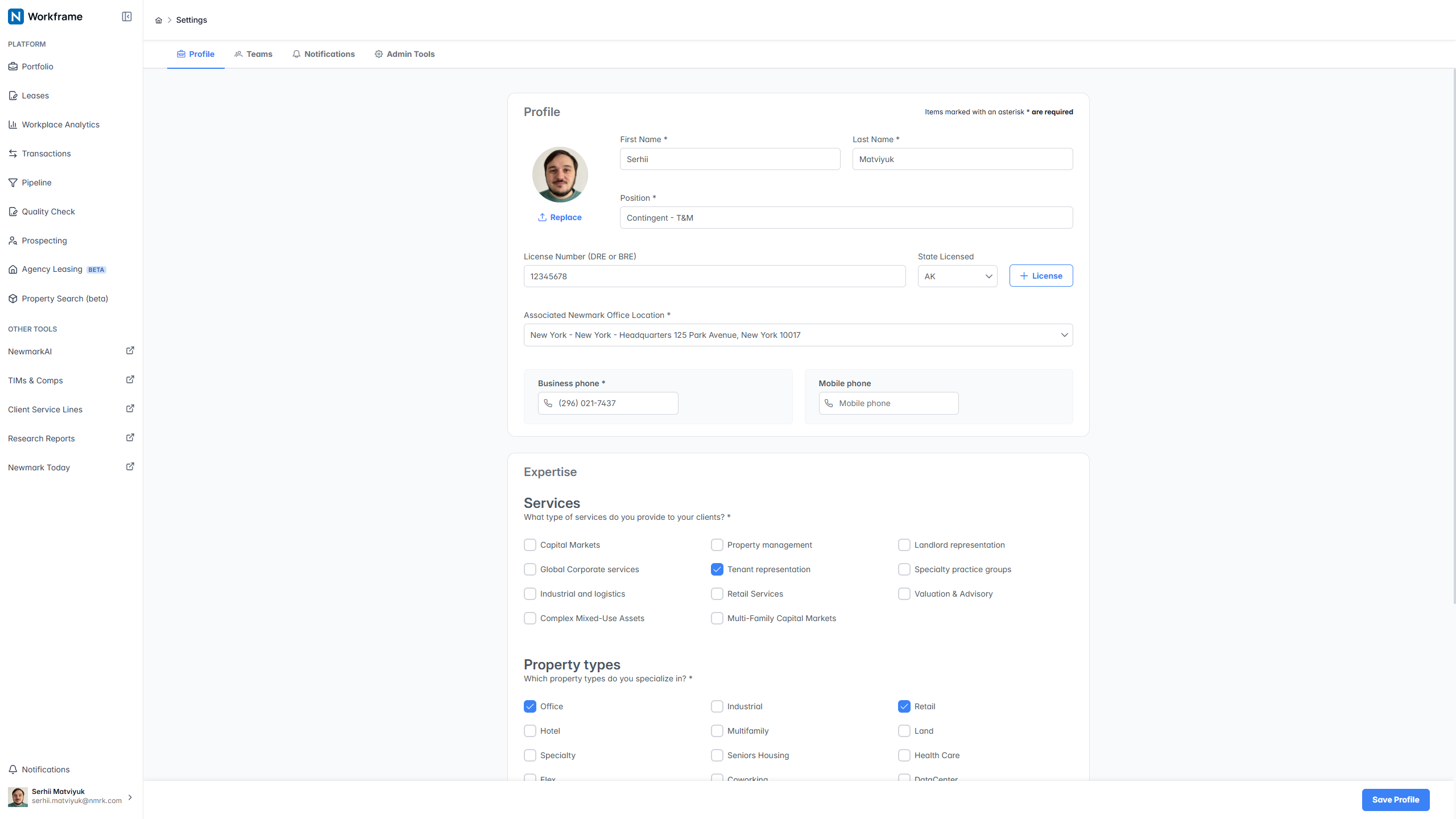
The transaction’s properties list every space with floor, status, available area, rent, opex and gross rent. The space panel records display name, status, available space, rent, lease type, term, class, building type, tenants, floor plans, photos and attachments, and ends with a Verify action. The tourbook places the selected properties on a map, with schedule, feedback and PDF editing beside each one.
Technology behind Workframe
A React front end split into modules, .NET services with REST and GraphQL, SQL Server and Azure.
Explore the technology and implementation
Typed interfaces and forms
React 18
TypeScript 5
PrimeReact 10
Redux Toolkit
Apollo Client 3
TanStack Query 5
React Hook Form
Zod
i18next
React 18 and TypeScript screens. Apollo Client runs the GraphQL queries; React Hook Form and Zod validate the forms.
Independently deployable modules
Module Federation
Vite 6
Turborepo 2
Yarn Workspaces
React Router 6
CSS Modules
React and TypeScript applications share components in a monorepo and use Module Federation for independently deployable modules.
Domain services and APIs
C#
.NET 8
ASP.NET Core
Hot Chocolate 13
REST
GraphQL
Entity Framework Core 8
Rebus
Polly
ASP.NET Core APIs expose REST and GraphQL endpoints, with Entity Framework Core and SQL Server for application records.
Records, search and background work
SQL Server
SQL row-level security
Azure AI Search
Azure Blob Storage
Azure Functions
Azure Storage Queues
Azure Service Bus
SQL Server provides record storage and row-level security. Azure AI Search handles search, Blob Storage holds files, and Functions, queues and Service Bus support background processing.
AI and external services
OpenAI SDK
Microsoft.Extensions.AI
Microsoft.Agents.AI
Databricks
SendGrid
Twilio
Cloudinary
OpenAI SDK and Microsoft AI libraries. Databricks for analytical data, SendGrid for email, Twilio for telephony, Cloudinary for media.
Identity, testing and delivery
Microsoft MSAL
Azure DevOps
Azure Artifacts
Docker
Nginx
Vitest
React Testing Library
xUnit
MSTest
OpenTelemetry
Azure Monitor
Sign-in through Microsoft MSAL. Releases through Azure DevOps with interface and service tests. Monitoring with OpenTelemetry and Azure Monitor.
The platform was built for one brokerage, but the records in it are common to commercial property businesses:
Commercial real estate brokerages representing tenants or landlords in several markets.
Corporate real estate and portfolio teams tracking leased area, costs and notice dates across many properties.
Lease administration and abstraction teams that extract terms from PDF leases and need a review and approval queue.
Advisory teams that shortlist, verify and tour spaces for clients and produce the tour materials.
Where we start
A first release usually covers one record and its review, such as leases with extraction, quality check and critical dates, or transactions with linked properties and tours.
Building software for a property team?
Show us one lease or deal, its documents and who reviews it. We will reply with the records, approval steps and integrations a first release would need.