A laboratory order followed through to the customer’s result
GrassrootsLabs sells laboratory tests online in the United States to people who pay out of pocket. Over four years we developed its platform: the customer buys a test, a partner laboratory performs it, and the result arrives in the customer’s account.
An order passes through checkout on the site, a visit to a test centre and a laboratory report that arrives later. It has to remain traceable at every step.
Partner programmes add their own rules. A member of a partner organisation has programme prices, a consent text to sign and an annual limit on orders.
One account also orders for dependents: a parent buys a test for a child from the same account.
Our work
Development of the storefront, customer accounts, partner programmes and the operations console, and the move of the existing platform to .NET 8 and Angular 18.
Project details
Client
GrassrootsLabs, a laboratory-testing service in the United States for people who pay for tests out of pocket.
Users
Customers ordering tests for themselves or a dependent, members of partner programmes, operations and support staff.
Country and platform
United States. One Angular web application serves the storefront, the customer account and the operations console; a .NET background service runs the laboratory exchange and email delivery.
Modules
Test catalogue, cart and checkout, test-centre finder, customer account with results and dependents, partner programmes, operations console, laboratory orders and results, email batches.
What changes for the team
Three groups use the platform: customers, members of partner programmes, and operations and support staff.
The price is settled before the order
The test price, the physician oversight fee and the lab draw fee are itemised in the cart, and Stripe takes the payment. The order reaches the staff already paid, or marked as a zero-cost order.
The platform applies each organisation’s ordering rules
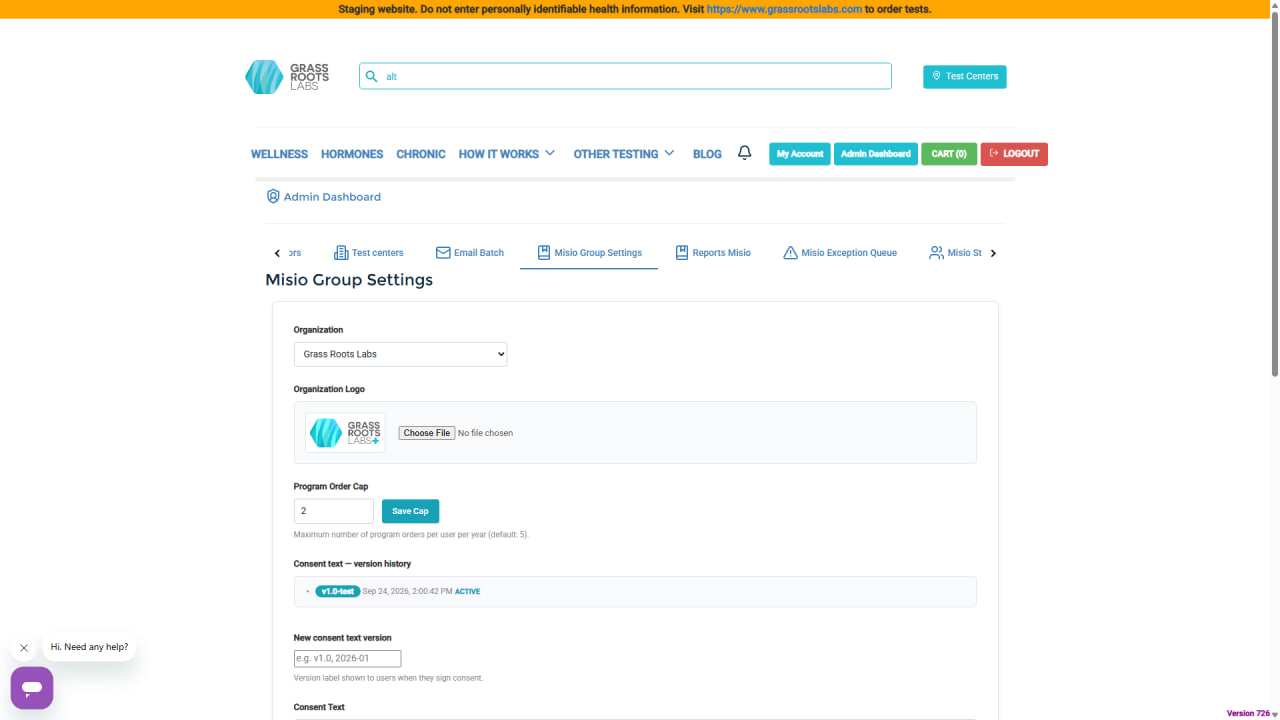
A member’s prices, consent version and annual order cap are applied by the platform. Staff change the cap or publish a new consent version in the organisation settings, and the member list syncs through the partner API.
Test centres and email batches are managed in the console
Test centres are updated by uploading a CSV file. Email batches to selected customer groups are started and tracked on one screen, with the status and recipient count of each batch.
Tell us how orders reach your provider, how reports come back and which cases your staff sort out by hand today. We will tell you what we would automate first.
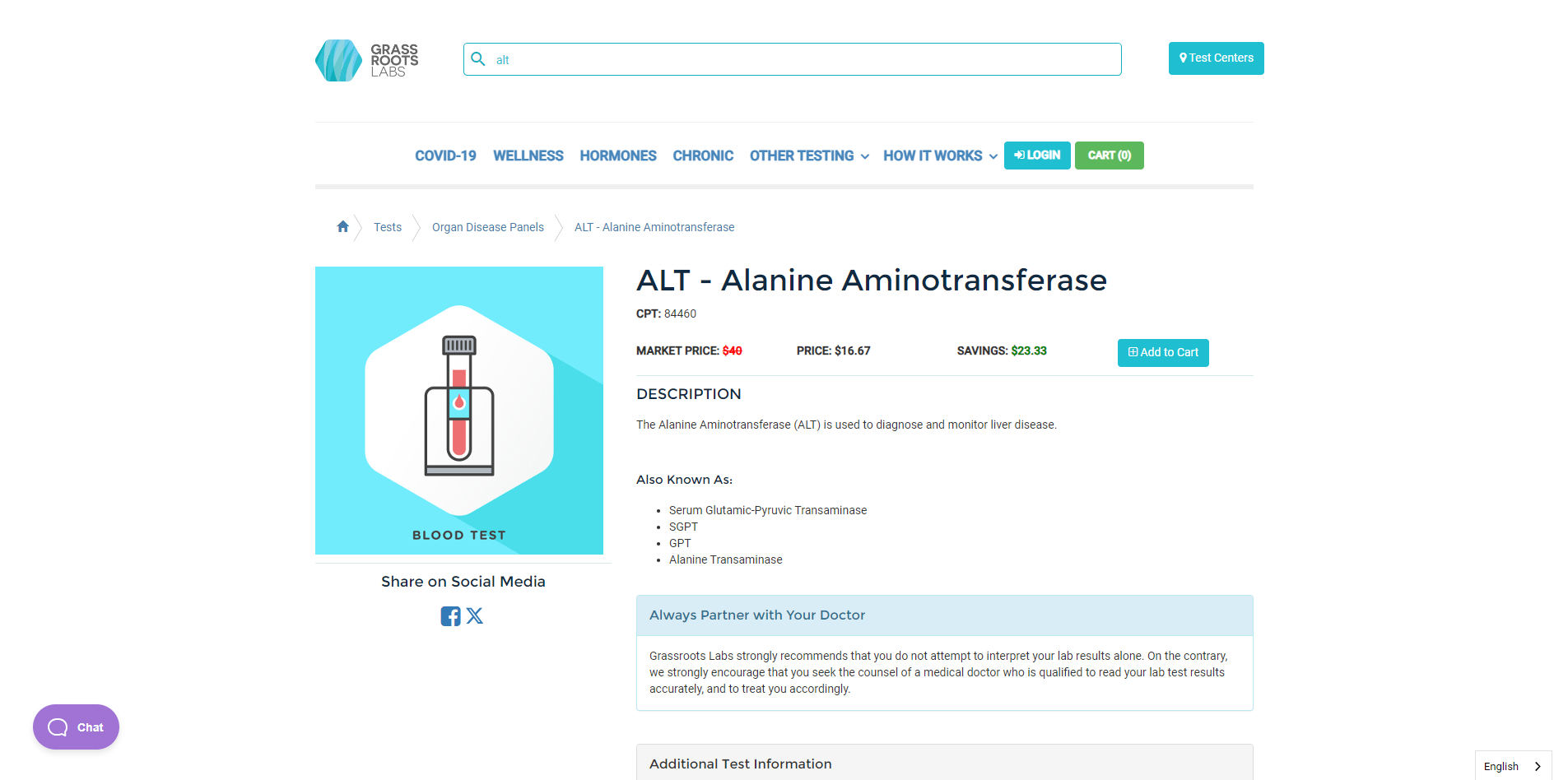
Enlarge imageThe test page shows the name, CPT code and price beside Add to Cart, then the description, alternative names and a notice to review results with a doctor.
Checkout with itemised fees
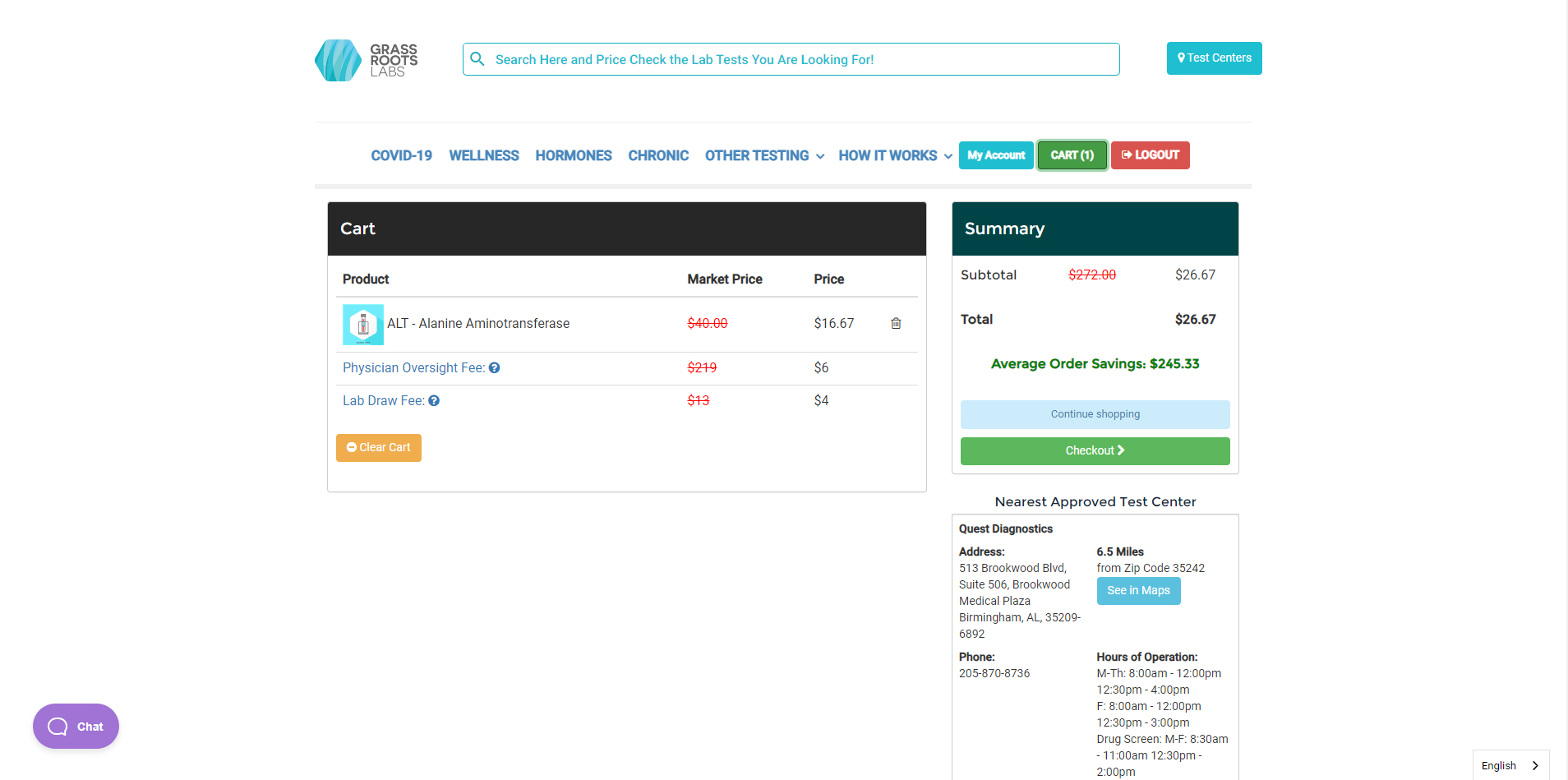
The cart lists the test price, the physician oversight fee and the lab draw fee separately. The nearest approved test centre is shown next to the order summary.
A member of a partner organisation signs in. Staff need to know which prices apply, how many programme orders the member may place this year and which consent terms they signed.
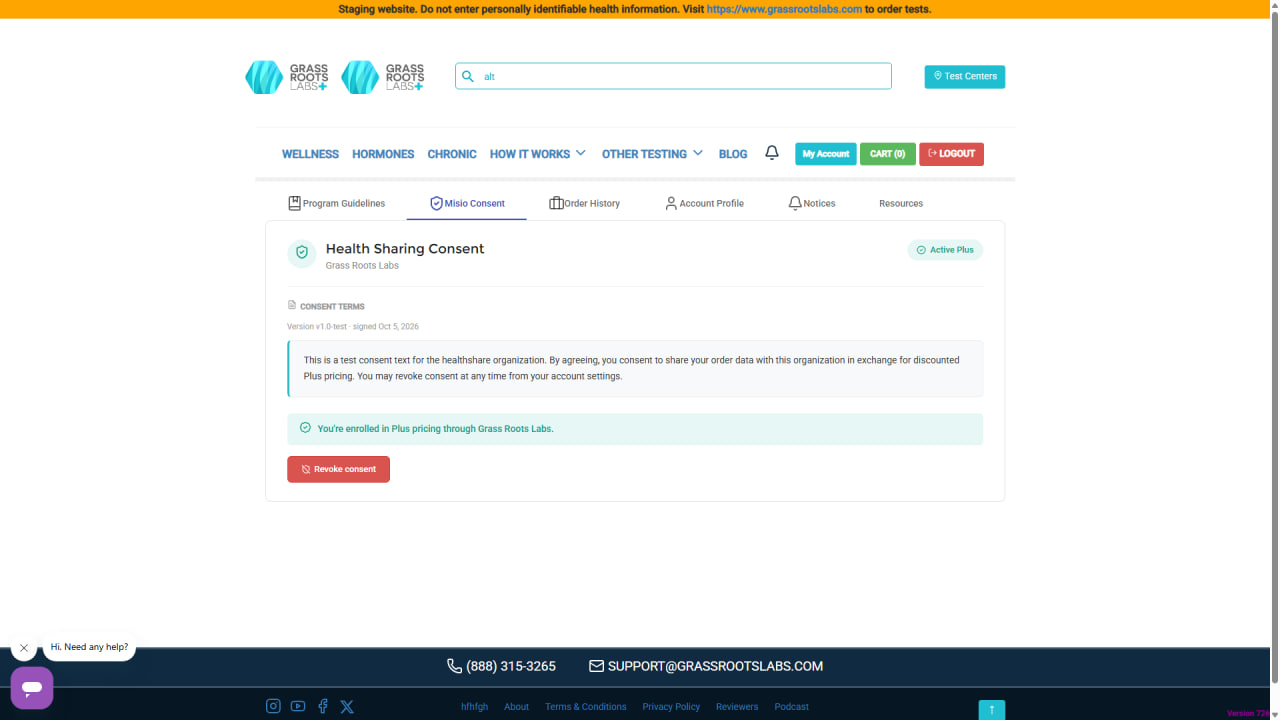
Staff set the organisation’s ordering limit and publish its consent terms. Members can see which version they signed and withdraw consent from their account; the partner API keeps the programme’s member list in sync.
More screens: Partner programme settings
Enlarge imageThe signed consent version and date, the programme pricing status and the button for withdrawing consent, next to tabs for programme guidelines, order history, profile and notices.
Test centres and email batches
The list of approved test centres changes, and the team wants to email the customers who ordered in the last year.
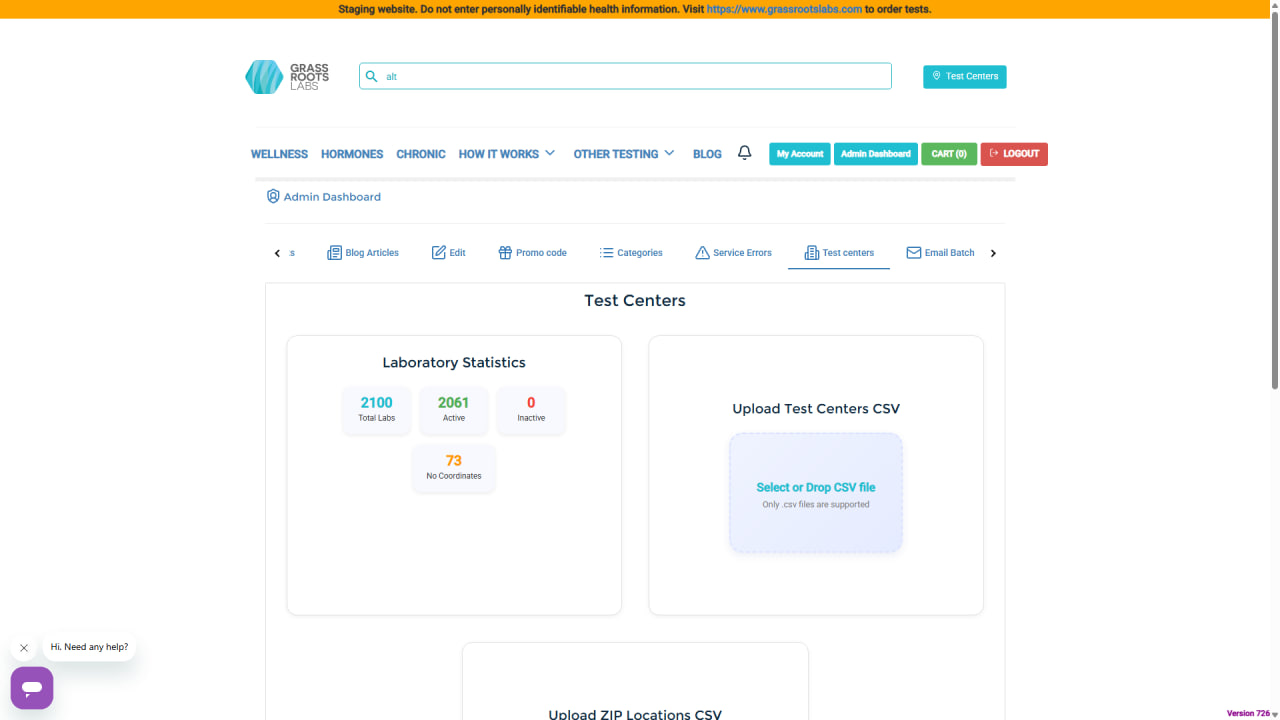
Staff update test-centre locations from CSV and review sites with missing coordinates. For customer communications, they choose an audience and template, then follow the batch status and recipient count in the console.
More screens: Test centres and email batches
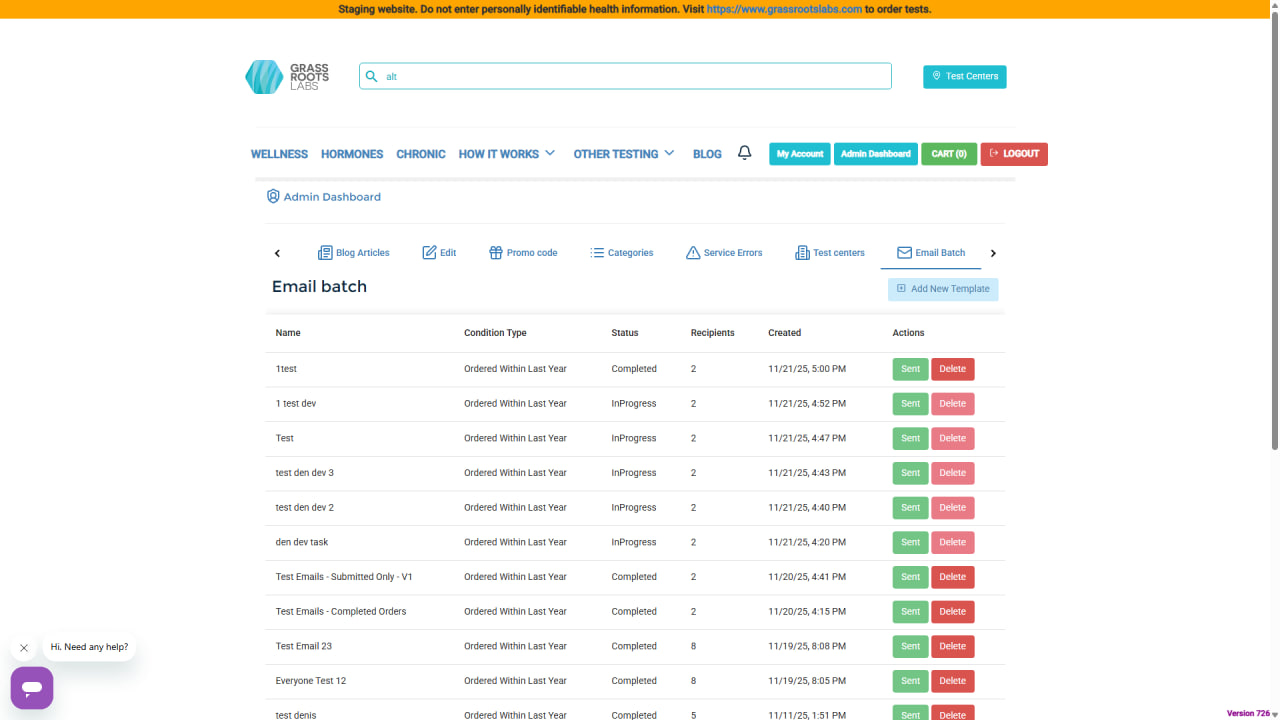
Enlarge imageEach batch shows its name, condition type, status, recipient count and creation date, with controls for sending or deleting it and a button for a new template.
After checkout: laboratory order and result
Three steps separate the payment from the result in the account.
The order goes to the laboratory
The laboratory partner receives the order details and the person being tested.
The laboratory report comes back
The background service fetches result files on a schedule, while nobody is signed in.
The document appears in the account
Customers download requisitions and results from their account, next to the order.
Platform updates and new features
From .NET Framework to .NET 8
The backend moved from .NET Framework to .NET 8, and Dapper replaced NHibernate. Angular 18 uses lazy-loaded feature modules; DbUp manages versioned database changes.
Account access
Authentication uses HttpOnly cookies, refresh-token rotation and session synchronisation across tabs. Email-code MFA and role-based access add controls around customer and staff accounts.
Payments, partner API and support
Stripe takes payments, the lab-ordering API carries orders and results, and a partner API synchronises members. Google Maps finds test centres, Paubox delivers email and Zendesk receives customer enquiries.
What we built
Test catalogue and test pages
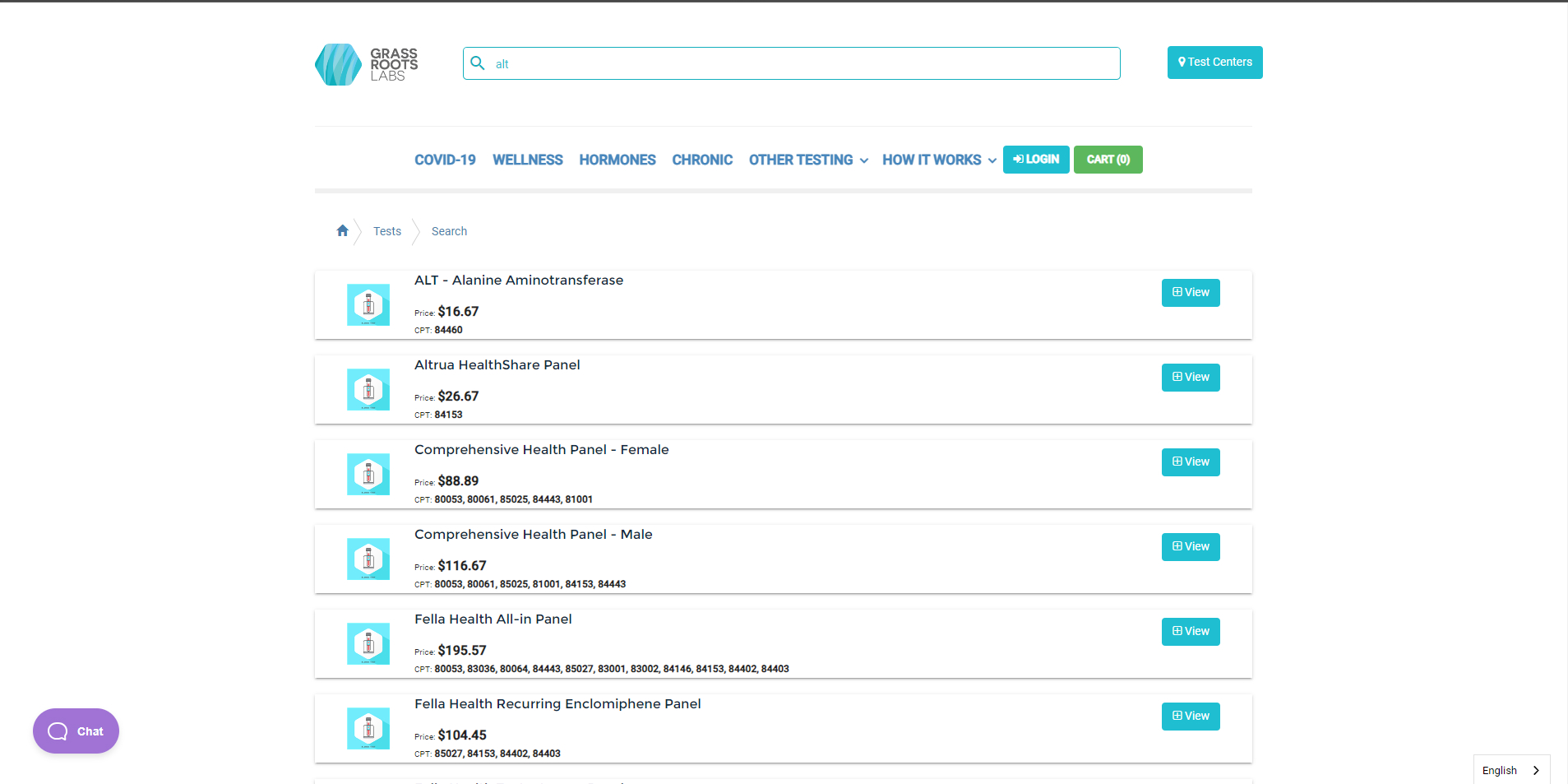
Search by name and categories such as wellness, hormones and chronic conditions. Each result shows the test name, price and CPT codes. The test page adds the description, alternative names, a notice to review results with a doctor and the add-to-cart action.
Cart and checkout
The cart lists each test with the physician oversight fee and the lab draw fee as separate lines, and the order summary beside them. Stripe Payment Element takes the payment and signed webhooks pass the payment events to the application. Zero-cost orders go through the same steps without a charge.
Test-centre finder
The nearest approved test centre appears next to the cart with its address, distance from the customer’s ZIP code, phone number and opening hours, with Google Maps for the location. Staff upload the list of test centres and ZIP locations from CSV files and see how many centres are active, inactive or missing coordinates.
Customer account
Order history, account profile, notices and resources in one account. Customers download requisitions and results next to the order, and every download is logged. Dependent profiles let a parent order a test for a child from the same account.
Laboratory orders and results
After checkout the order goes to the laboratory partner through its API. The background service fetches result files on a schedule, matches each report to its order and makes the document available in the account. Reports that do not match automatically are listed for staff to match by hand.
Partner programmes
Each partner organisation has its own logo, consent text and annual order cap. Members join by invitation, sign the current consent version, see the programme guidelines and pay the organisation’s prices. The account shows which version they signed and when, and lets them withdraw consent. A partner API keeps the member list in sync.
Operations console
Tabs for orders, products, categories, transactions, promo codes, users, the email log, blog articles, service errors, test centres and email batches. Staff search, edit and remove catalogue categories, review laboratory orders and tests and inspect service errors on the same dashboard.
Email batches and support
Staff create an email template and send it to a customer group selected by a condition, such as customers who ordered within the last year. Each batch shows its status, recipient count and creation date. Paubox delivers the emails and Zendesk handles support enquiries.
The technology behind GrassrootsLabs
One Angular application for the storefront, the customer account and the operations console, with a .NET background service behind it.
Explore the technology and implementation
Customer interface
Angular 18
Angular Material
TypeScript
RxJS
SCSS
Storefront, accounts and console in Angular 18 with Angular Material and RxJS, split into lazy-loaded feature modules.
Application and background work
C#
ASP.NET Core 8
.NET 8 Windows Service
AutoMapper
The API runs on ASP.NET Core 8. A Windows Service runs scheduled order synchronisation, email delivery and partner updates.
Orders and service records
SQL Server
Dapper
DbUp
SQL Server database. Dapper replaced NHibernate for data access, and DbUp versions the schema changes.
Hosting and operations
Microsoft Azure
Azure Key Vault
Application Insights
Azure DevOps
xUnit
Jasmine
Karma
Hosted on Microsoft Azure. Secrets are kept in Key Vault, monitoring runs in Application Insights, delivery and test plans in Azure DevOps.
Payments and service integrations
Stripe
Lab-ordering API
Partner API
Paubox
Google Maps
Zendesk
Payments, laboratory exchange, partner member lists, email, maps and customer support.
The platform was built for one laboratory service, but its rules are common to businesses that sell a service online and depend on an outside provider to deliver it:
Laboratories and diagnostic centres that sell tests online and receive results from a partner laboratory.
Clinics, imaging and wellness services that take appointments and payments online and hand over a document afterwards.
Services where one customer account orders for a dependent or a family member.
Companies with sponsored or employer programmes: members with their own prices, consent terms and order limits.
Operators that keep a list of collection points, branches or partner sites current and send scheduled emails to customers.
Where we start
A first release usually covers the catalogue, cart and online payment for one service line, with the customer account where the result or document appears. The provider exchange and partner programmes follow once the first orders are running.
Discuss your lab-testing platform
Walk us through one customer order: what the customer pays for, who performs the service and which document comes back. We will tell you what a first release should cover.