The routine call is made by the agent
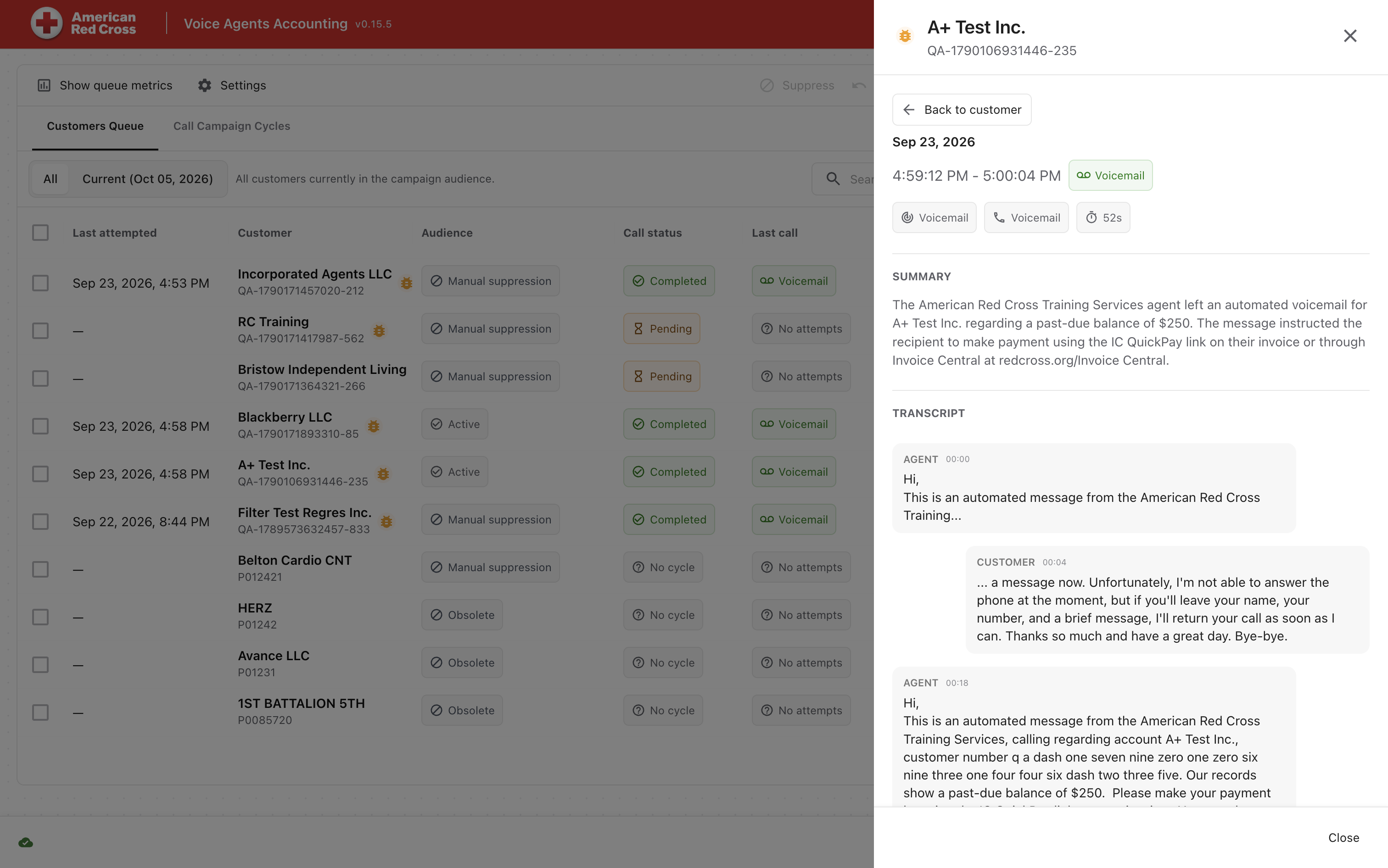
The agent states the account, the past-due balance and the ways to pay, and leaves a voicemail when nobody answers. Staff read the summary instead of making the call.
Call records and transcriptsWe built a voice-agent service for American Red Cross Training Services. The agent phones customers about overdue training invoices. Accounting staff set the calling rules, read the transcript of every attempt and see in a cycle report who promised to pay.
What changes for the teamIn development since December 2025
An overdue-account call needs the correct balance and a record of the customer’s response. Staff must also be able to exclude an account and control the timing of repeated attempts.
The service imports customers and balances from CFS, so the agent quotes the figure the accounting system holds.
Development of the calling service and the operator workspace: a React and Material UI interface, Node.js and Fastify services on PostgreSQL, ElevenLabs and Twilio for the calls, Microsoft Azure and Entra for hosting and sign-in.
The agent makes the reminder call. Accounting staff decide who is called and what to do with each answer.
The agent states the account, the past-due balance and the ways to pay, and leaves a voicemail when nobody answers. Staff read the summary instead of making the call.
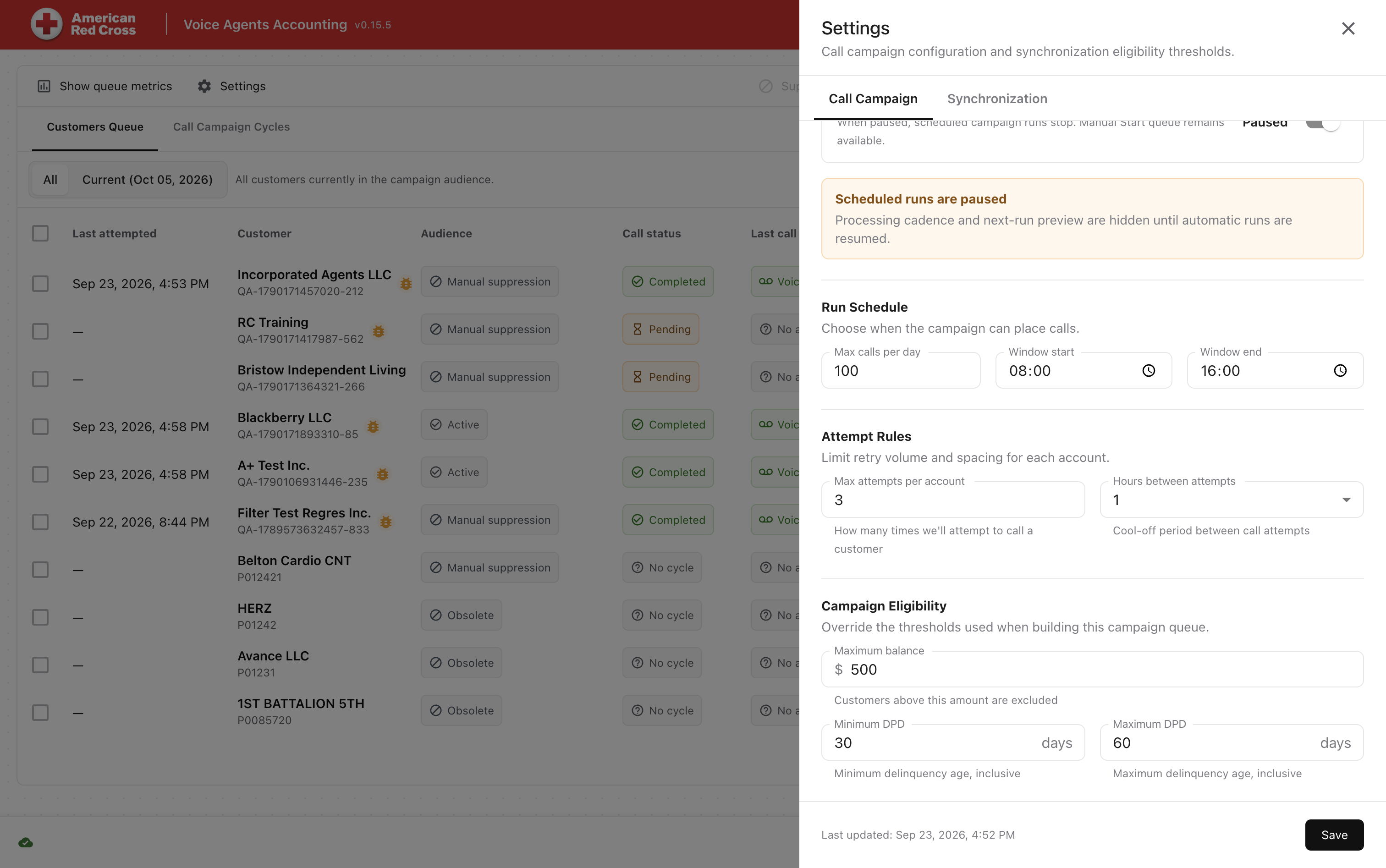
Call records and transcriptsBalance and days-past-due thresholds, the calling window, the daily limit and the attempt rules are set in one settings panel, where automatic runs are also paused. A customer is excluded by hand, and the reason, author and time are kept.
Campaign settingsA status such as Completed or Voicemail opens into the summary and transcript of that attempt, so a dispute or a promise to pay is checked against what was said.
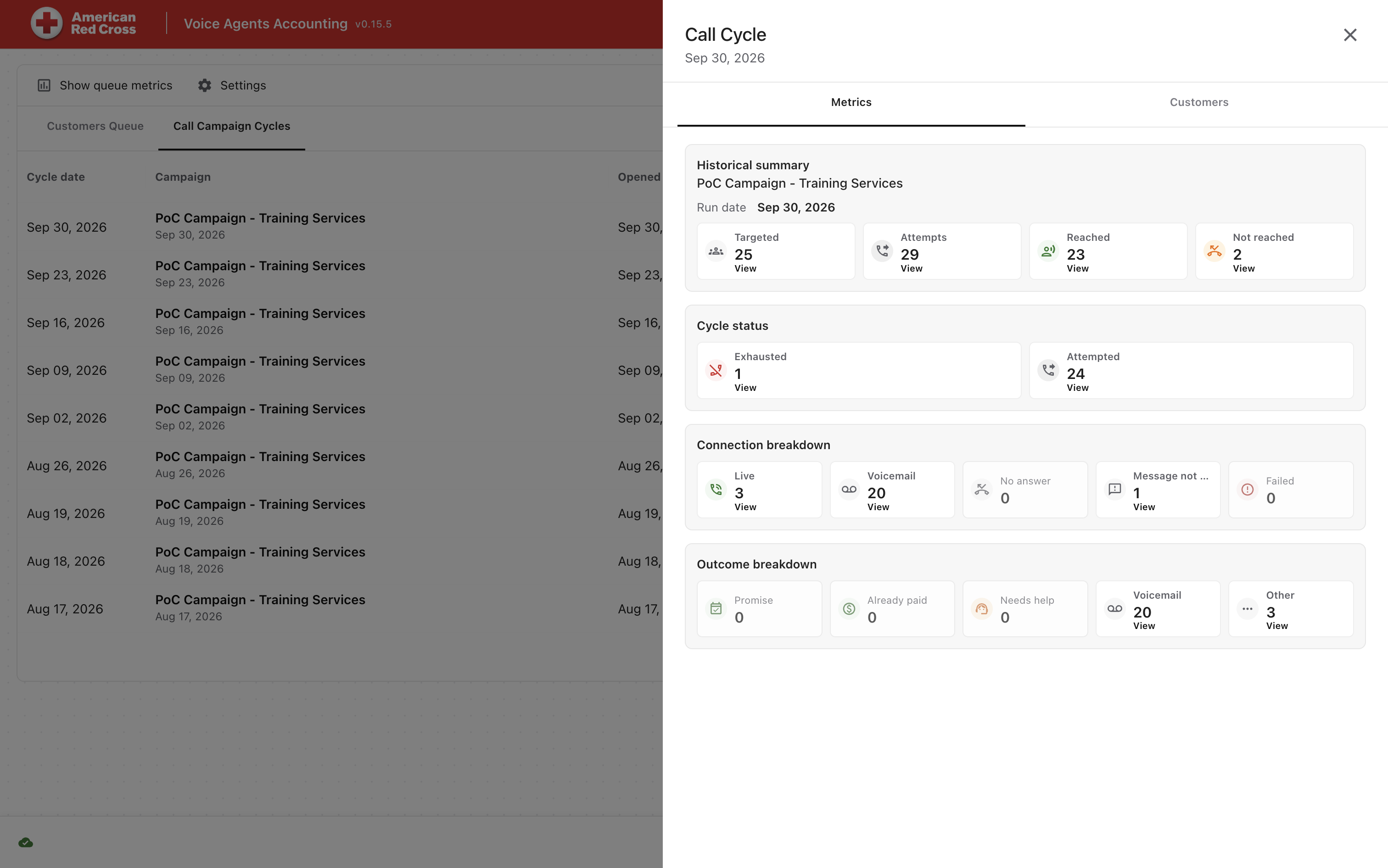
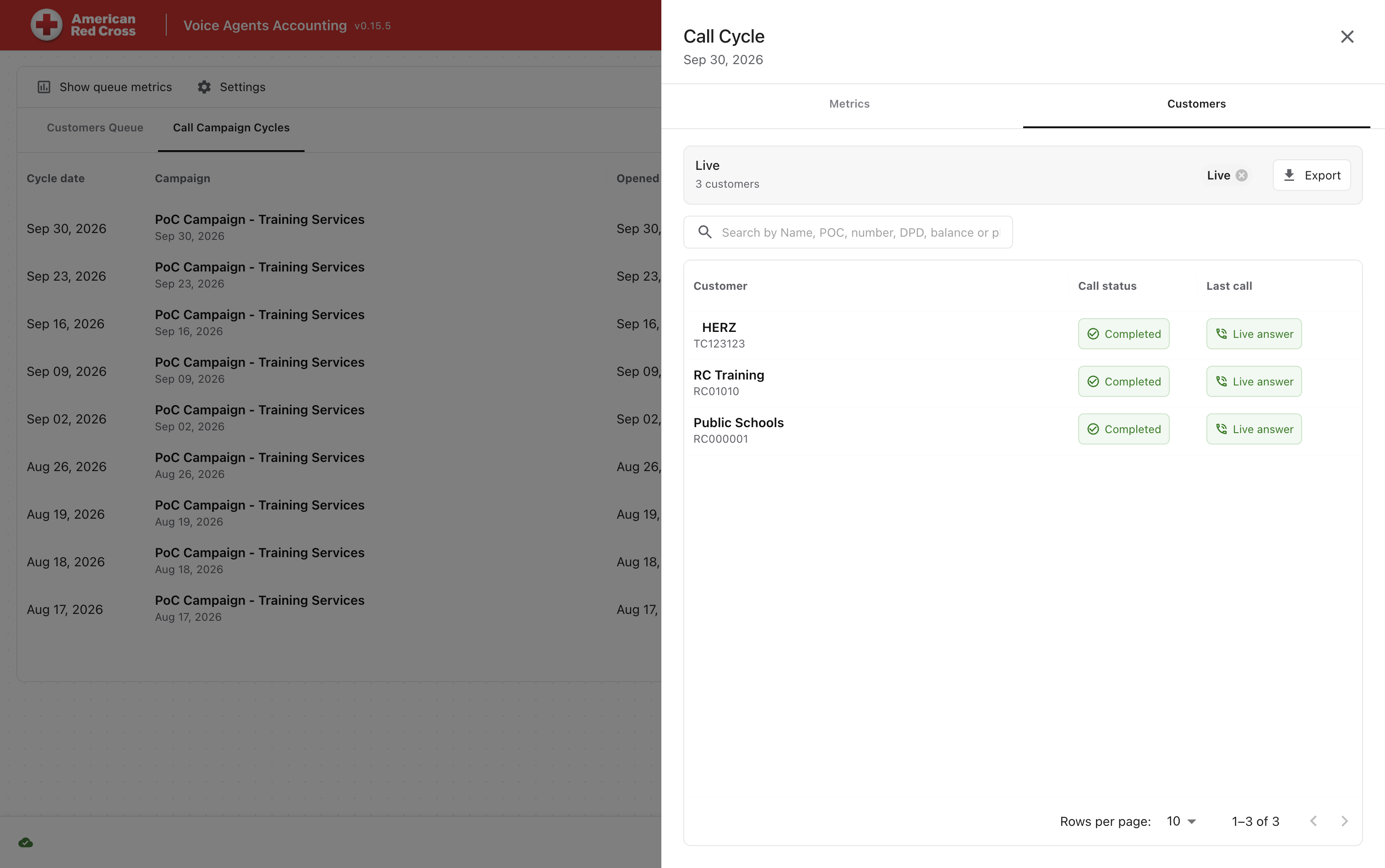
Call records and transcriptsThe report separates calls answered by a person, voicemail and connection failures from the responses recorded: a promise to pay, a payment already made or a request for help. Each count opens the relevant customer list.
Campaign reportsFor every call, staff need to know that the account met the rules, that nobody had excluded it and that the attempt limit was not exceeded.
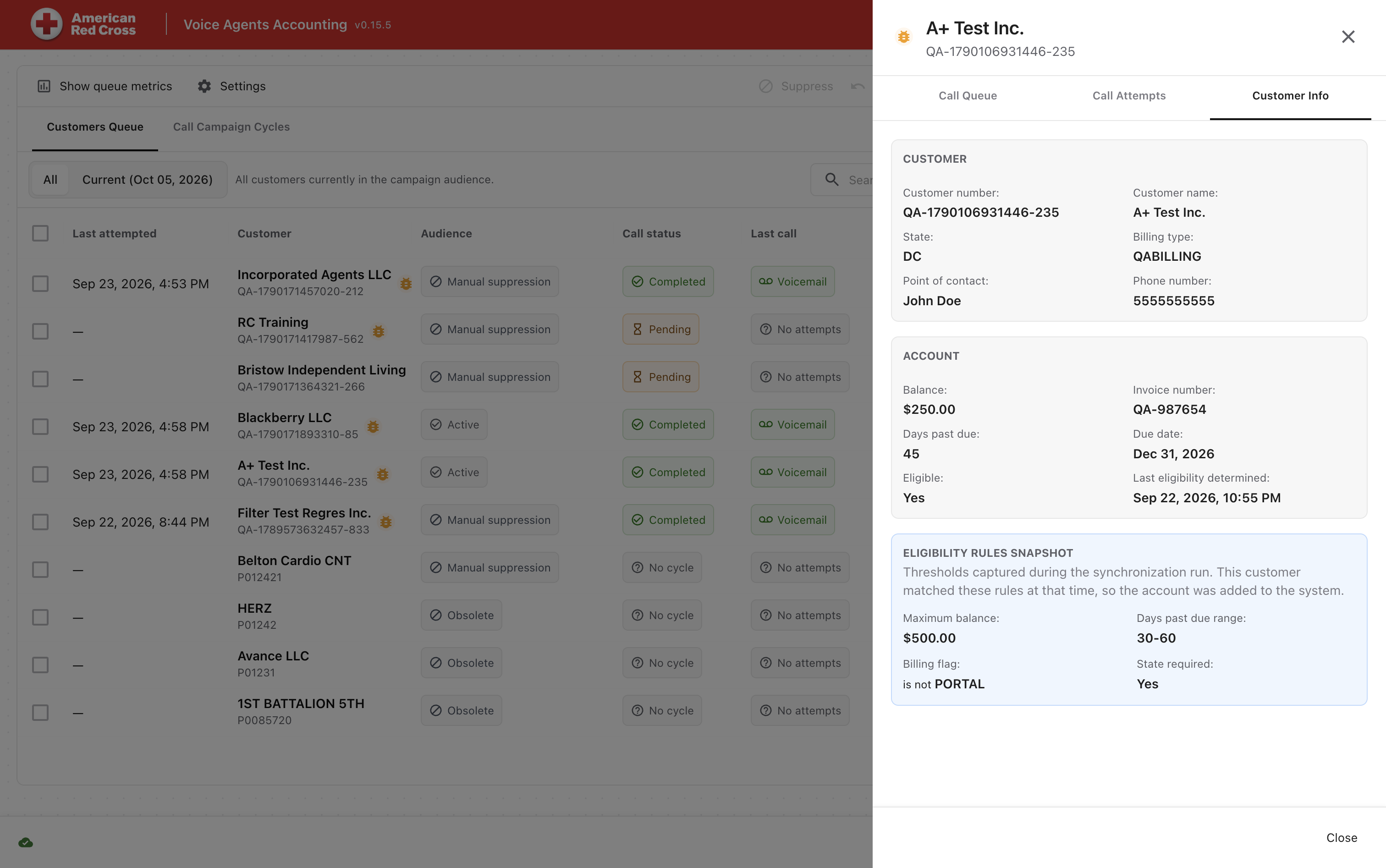
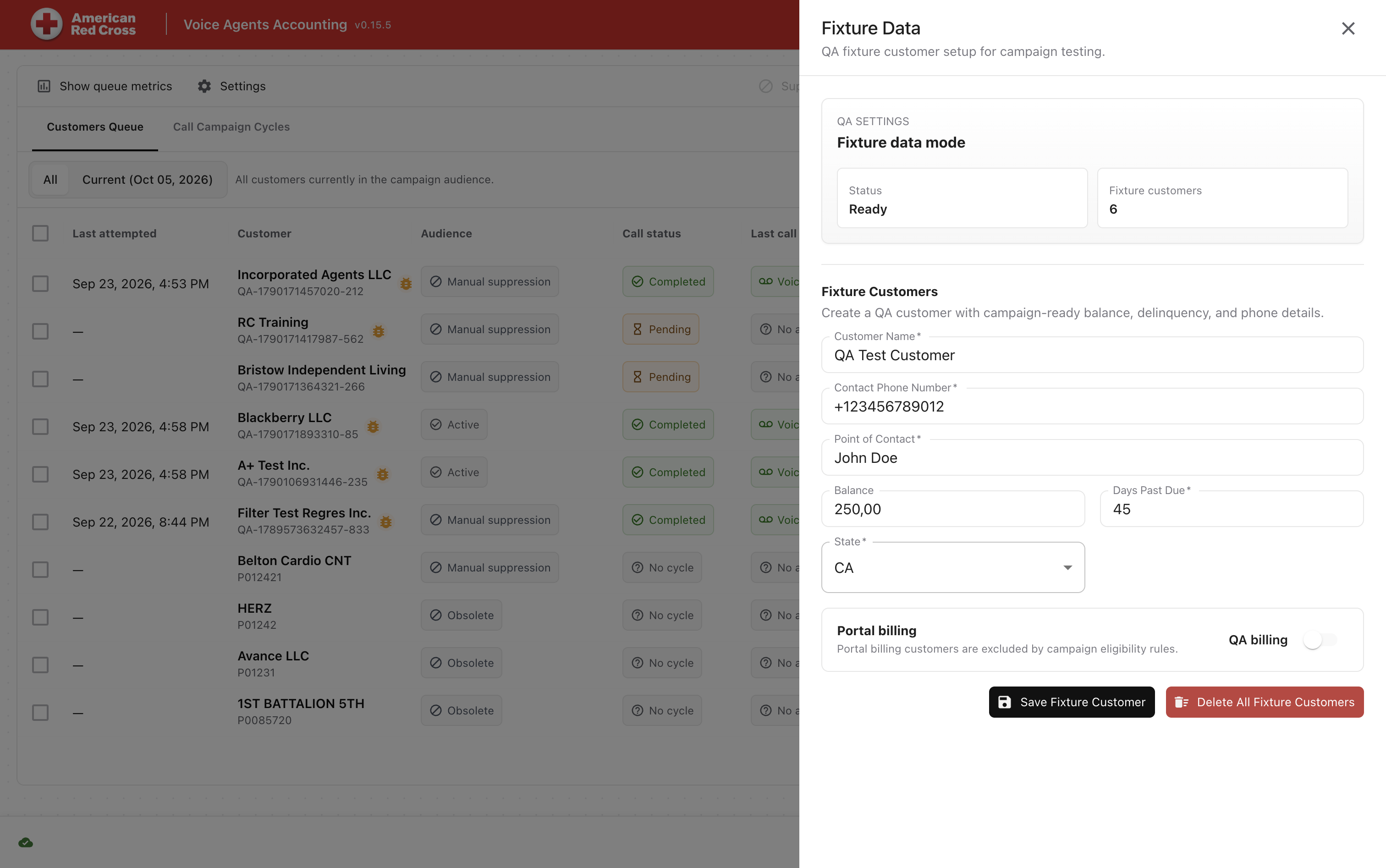
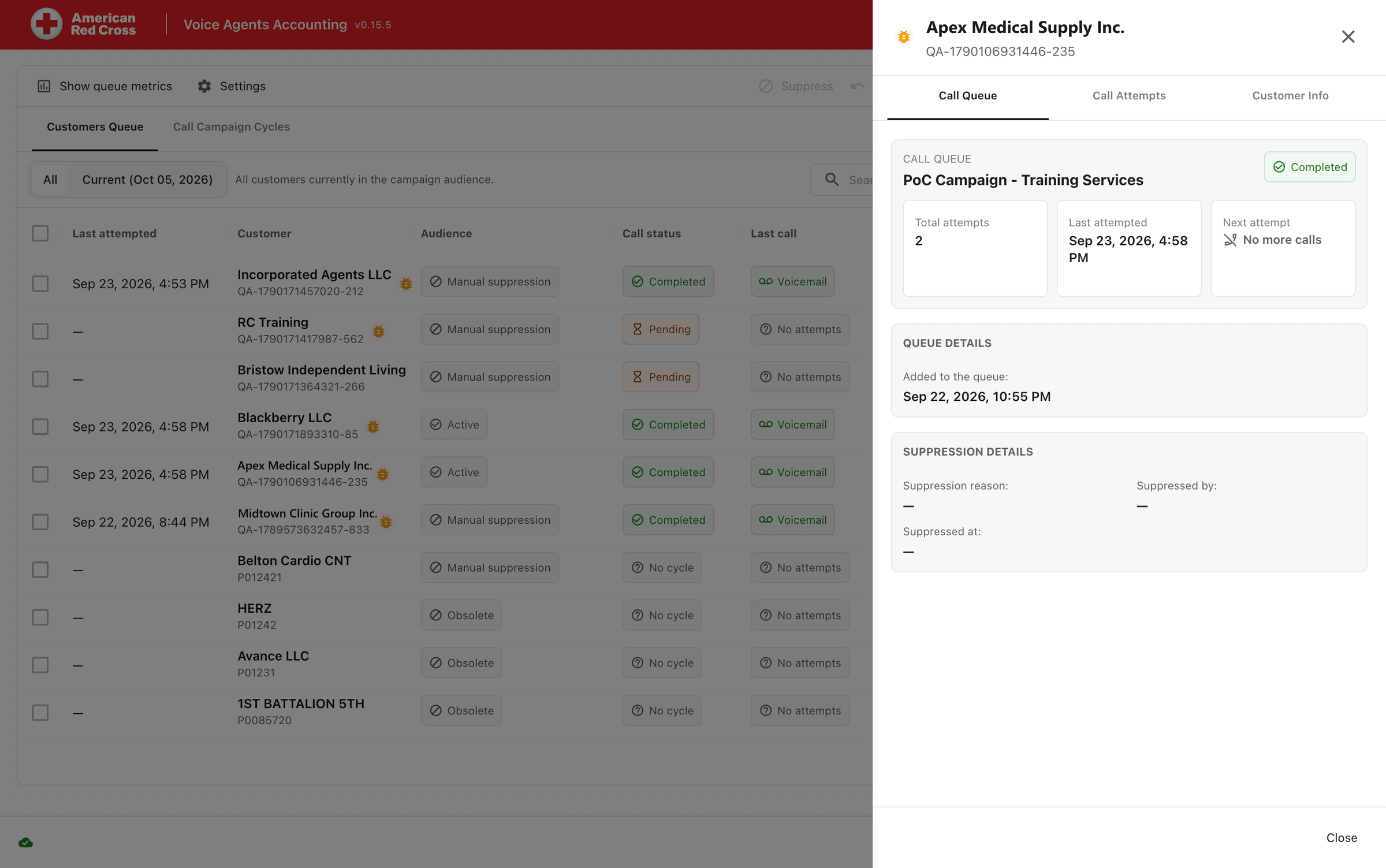
Each account in the queue keeps a snapshot of the rules it matched at synchronisation: maximum balance, days-past-due range, billing flag and state. The side panel shows how many attempts were made and whether another is scheduled. New rules are tried on test customers created in the workspace before real customers are called.
Inspect the campaign controlsTell us whom you never call and how often you are willing to call the rest. We will tell you which rules and limits the campaign needs and how to test them before the first real call.
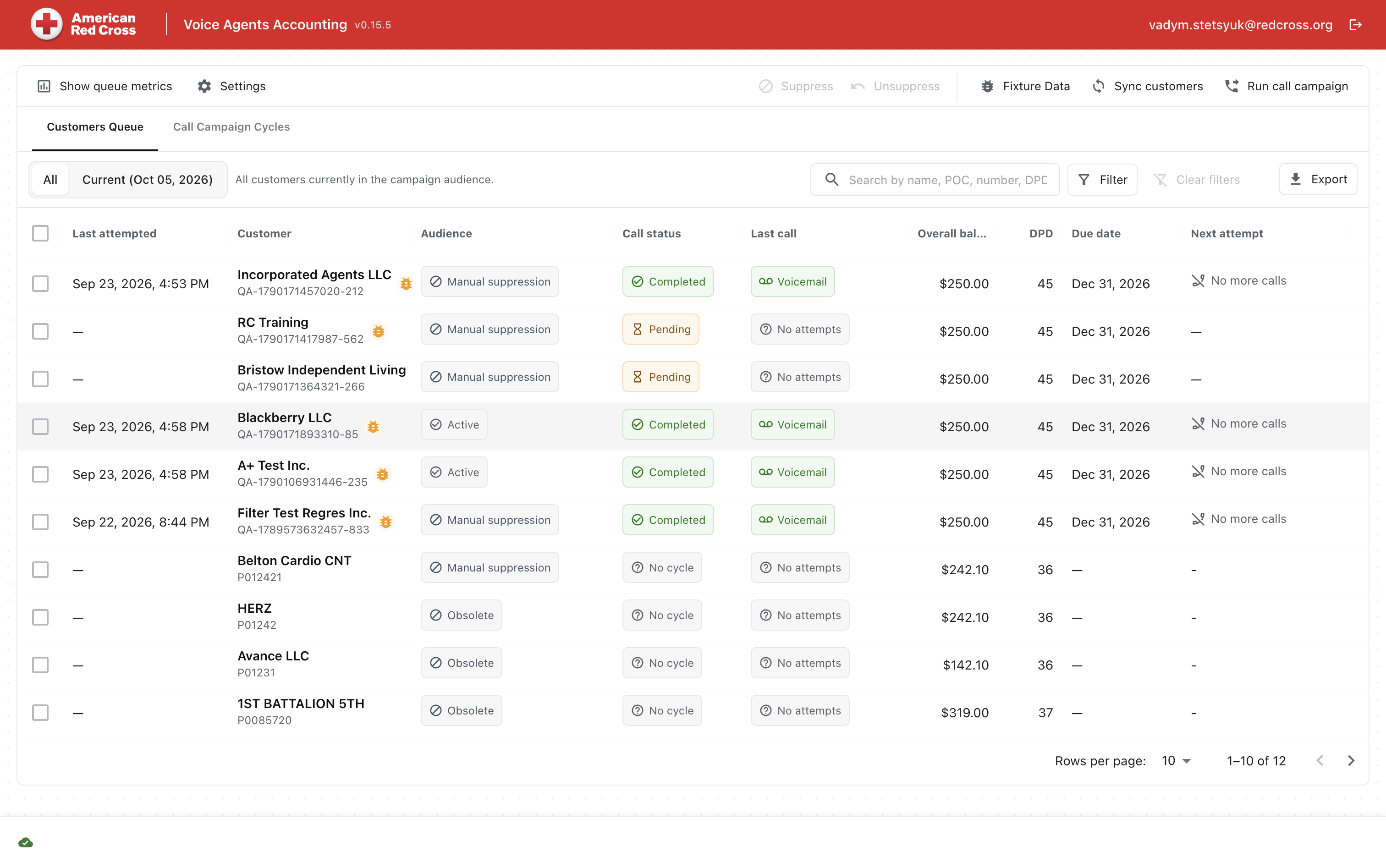
Before a call cycle runs, the operator wants to know who is in the audience, who has already been reached and who must be left alone.
The Audience column marks each customer as active, manually suppressed or obsolete. A click on a customer opens the rules the account matched and, for a suppressed one, who excluded it and why.
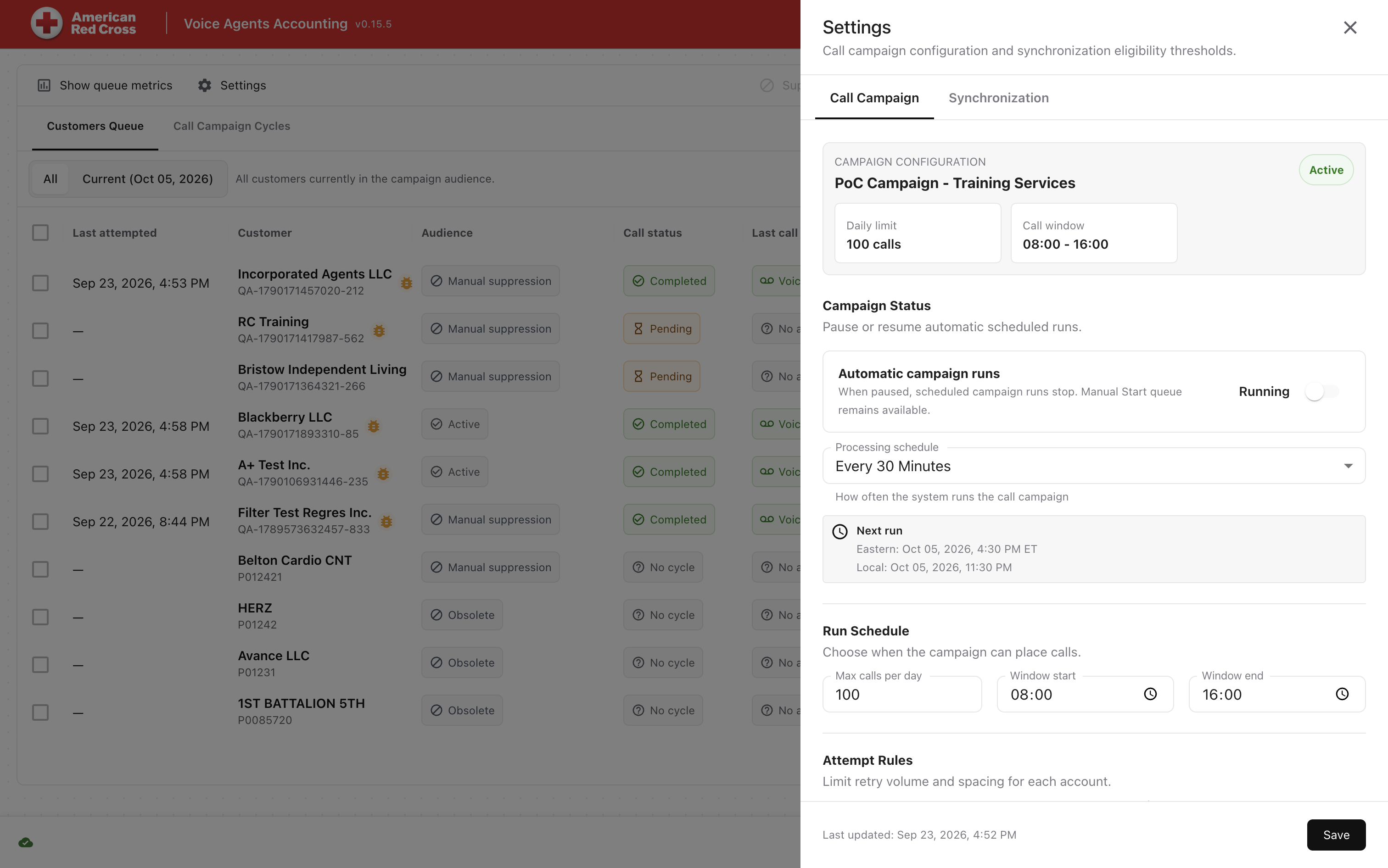
The campaign screen shows its state, the processing frequency, the next run, the daily call limit and the calling window.
Pausing stops the scheduled runs only. An operator can still start the queue by hand.
The calling list must match the accounting system, and new rules have to be tested before real customers are called.
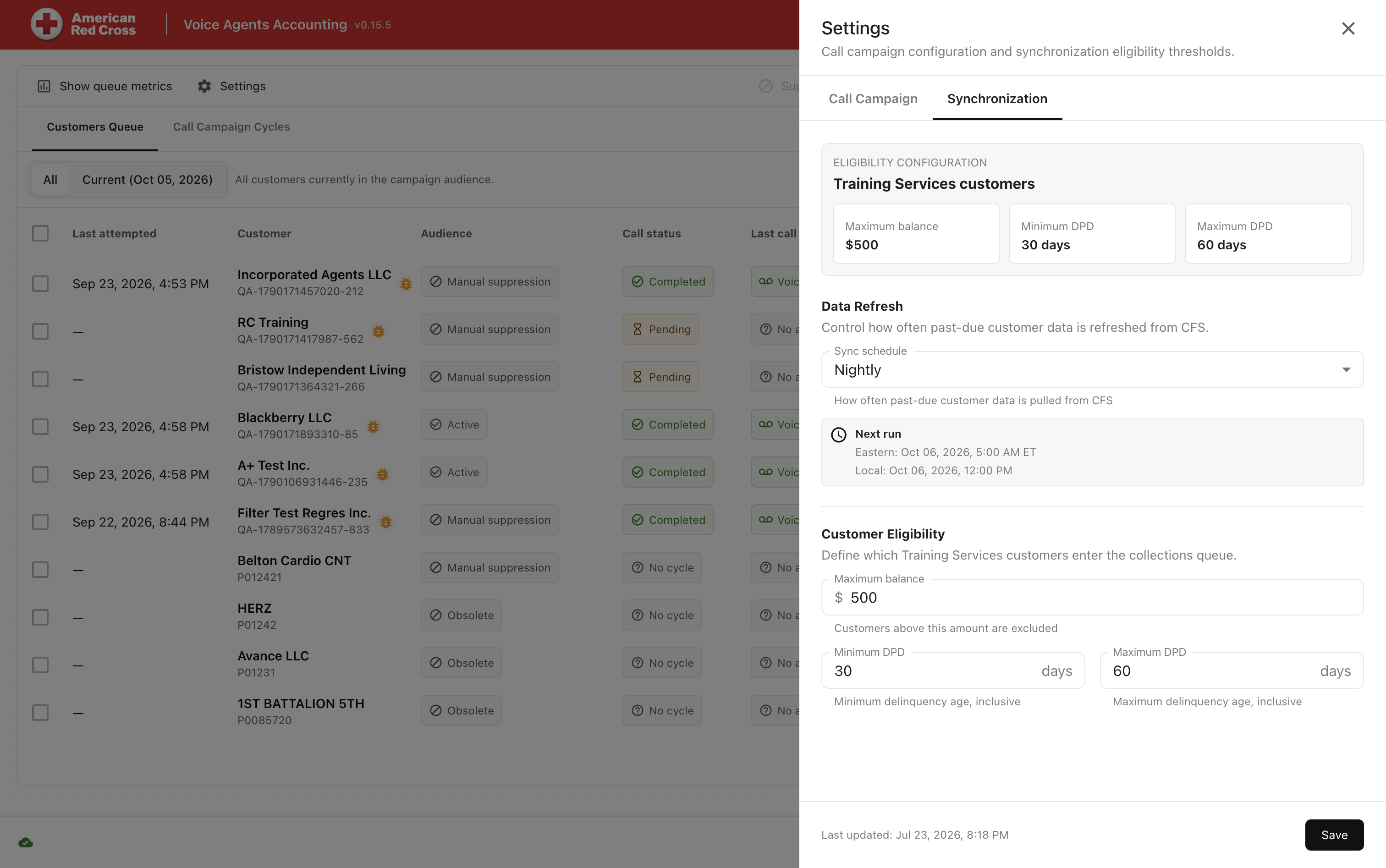
The CFS import runs on its own schedule, separate from the calling schedule, with its own balance and overdue thresholds.
After a call cycle, the manager checks who answered, who promised to pay and which accounts need staff follow-up.
A manager opens the customers behind any figure, reads their call records and decides who needs another conversation.
Every customer in the campaign audience with the last attempt, audience status (active, manually suppressed or obsolete), call status, last call result, overall balance, days past due, due date and next attempt. Operators search by name, contact, number or days past due, filter, export and suppress a customer from calls.
A side panel with the customer number, state, billing type, point of contact and phone, then the balance, invoice number, days past due, due date and eligibility. A snapshot keeps the rules the account matched at synchronisation: maximum balance, days-past-due range, billing flag and state.
Each attempt has a date, time, duration and result, including voicemail or an answer by a person. Staff can read its summary and the transcript with agent and customer turns. Retries have separate records.
Daily call limit, calling window, processing frequency and the next run in Eastern and local time. Automatic runs can be paused while manual starts remain available. Attempt rules limit the number of retries and the hours between them.
Customers and balances are imported from CFS on their own schedule, using balance and days-past-due thresholds. A test-data form creates customers with a phone, balance, overdue period, state and billing flag to check who the campaign will and will not call.
A campaign cycle shows the selected customers, call attempts and how many customers the service reached. Separate breakdowns show connection status and the customer’s response. Opening a figure reveals the customers included in it.
ElevenLabs and Twilio for the calls, Node.js services on PostgreSQL, a React workspace for operators.
The queue, settings and call-review screens, built with React, TypeScript and Material UI.
Node.js and Fastify services on PostgreSQL.
ElevenLabs for the agent’s voice, Twilio for the telephone calls.
Hosted on Microsoft Azure. Staff sign in through Microsoft Entra.
The service was built for one receivables team, but the pattern — an eligible list from the accounting system, calling rules, recorded attempts and a cycle report — fits other high-volume outbound calling:
Accounts-receivable and billing teams in training, education, healthcare supply and B2B services that chase overdue invoices by phone.
Logistics and field-service companies that confirm appointments, deliveries or collection dates with many customers a day.
Customer service desks that return calls or deliver status updates on open cases.
Any organisation whose call list is defined by rules in an existing system, such as a balance, a date or a status.
A pilot usually covers one campaign: your call script, the eligibility rules and calling hours, an import from your accounting or CRM system, and the operator screens for reviewing attempts and transcripts, with a test group before live accounts.
Send us one reminder script and tell us which system holds the balances. We will reply with what a first campaign would take: the import, the rules and the operator screens.
Discuss your voice workflow